Invoices
Bill customers for routes, repairs, monthly service, and ad-hoc work in Pool Runs — from manual invoices to bulk generation, payment tracking, and aging.
Invoices
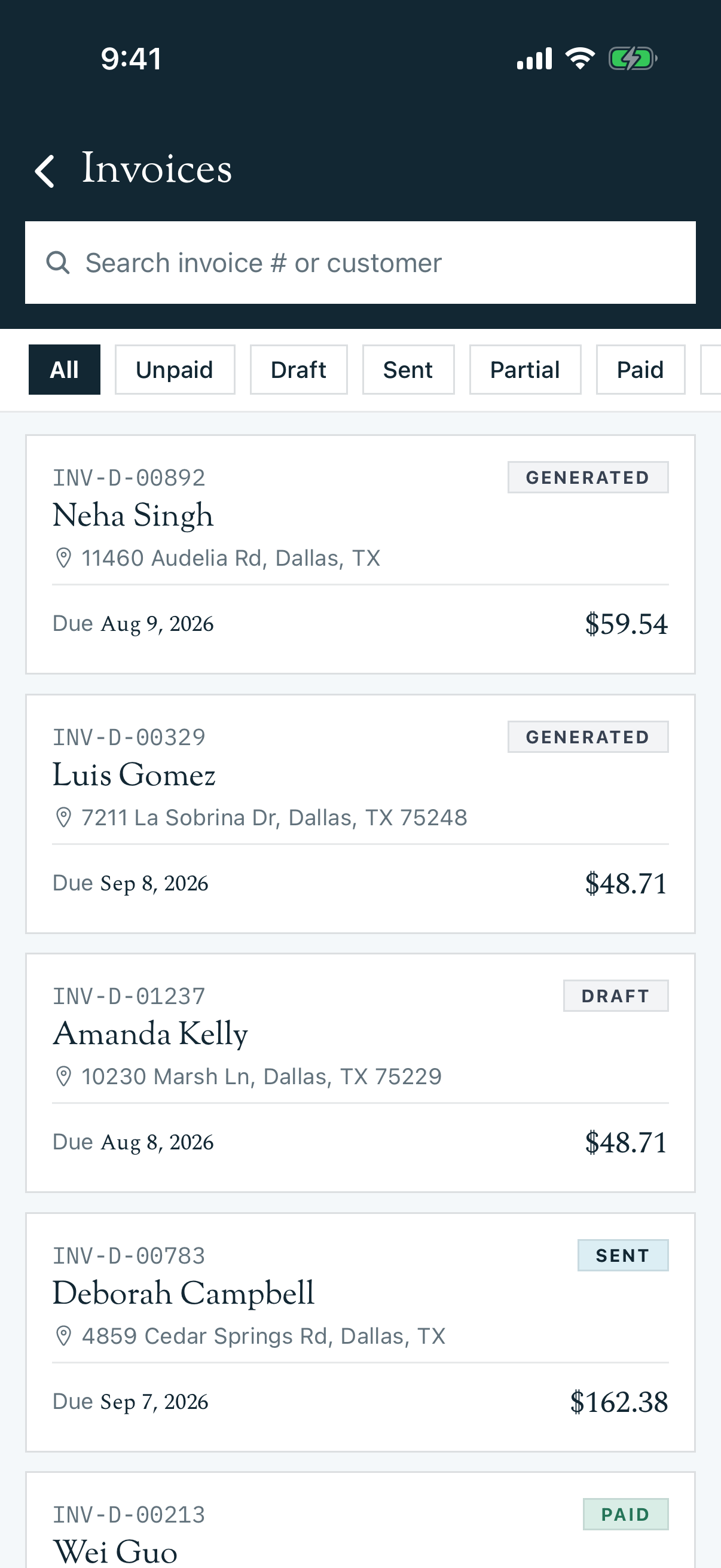
An invoice in Pool Runs is the financial document you send to a customer asking them to pay. Pool Runs supports a wide spectrum of invoicing — from a one-line repair invoice typed manually on a Tuesday afternoon, to a 200-customer monthly billing run that sweeps every completed route stop, chemical dose, and installed part into one bulk batch on the first of the month. This section walks through every way invoices come into existence, how to send and collect on them, and how to clean them up when something goes wrong.
Invoices on Mobile
Authorized staff can run the day-to-day invoice workflow from the mobile app. Open More → Invoices to search and filter invoices, open full totals and payment history, or create a new draft. Depending on status and permissions, the invoice detail screen can edit draft line items, finalize the invoice, email it, share its payment link, record a payment, void it, or delete a draft. QuickBooks-managed organizations see the correct QuickBooks handoff instead of Pool Runs send controls.
Bulk Invoice Generator runs and organization-wide billing setup remain office workflows in the web app.
Reading order: This page documents how invoices work as a Pool Runs feature. For where invoices end up and how reconciliation works in your business, read your setup guide instead — Pool Runs + QuickBooks or Pool Runs + Stripe.
In This Section
Concepts
- Invoices Overview — What an invoice is, the status lifecycle (
draft→sent→paid), and the four ways one comes into existence.
Creating Invoices
- Creating Invoices Manually — The full invoice form: customer, property, line items, taxes, terms, due dates, messages.
- Invoice Generator (Bulk Billing) — Three-tab flow that sweeps completed routes, work orders, dosages, and installed parts into a batch of invoices.
- Recurring & Auto Invoicing — Monthly-rate billing, autopay enrollment, and billing run history.
Delivery & Payment
- Recording Payments — Manual entry (cash, check, ACH), online Stripe payments, and partial payments. (Sending invoices via email and the public payment link is covered in Invoices Overview.)
- Invoice Adjustments — Discounts, credits, voids, and refunds.
Money Management
- Tax Zones & Tax Management — Tax zones, ZIP-based resolution, line-item taxability, and customer tax exemption.
- Collections — Manual payment recording, late fees, and write-offs.
Quick Reference: Invoice Statuses
| Status | What it means | Editable? | Customer can pay? |
|---|---|---|---|
| Draft | Created in the office, not finalized. | Yes — full edit including line items | No (no payment link yet) |
| Generated | Finalized invoice number assigned, not sent yet. | Limited — header fields only | Yes if shared internally |
| Sent | Emailed to the customer with a payment link. | Limited — can void/cancel | Yes |
| Viewed | Customer opened the email or link. | Limited | Yes |
| Partial | Some payment received, balance remains. | Limited | Yes (remaining balance) |
| Paid | Total amount collected. | No | N/A |
| Overdue | Past the due date and not fully paid. | Limited | Yes |
| Cancelled | Cancelled by staff before any payment. | No | No |
| Void | Voided after issuance (preserved for history). | No | No |
| Refunded | Fully refunded after payment. | No | No |
See Invoices Overview for the full state machine and what each transition triggers.
The Four Ways an Invoice Is Born
Pool Runs gives you four entry points so you never have to retype work that's already been logged. Use the right one for the situation:
| Entry point | Best for | Where to find it |
|---|---|---|
| From a quote | Approved repair quotes, projects, deposits | Quote detail > Generate Invoice |
| From a work order | Completed work orders without a quote | Work Order detail > Create Invoice |
| Invoice Generator | Bulk billing — routes, work orders, chemicals, parts for a date range | Billing > Invoice Generator |
| Manual invoice | Anything ad-hoc that didn't come from a route/WO/quote | Invoices > + New Invoice |
Pool Runs prevents double-billing across all four paths — once a route stop, work order, or chemical dose is on an invoice, it won't appear in the Generator again. See Invoices Overview for the safeguard rules.
Where Invoices Connect
| Connected To | What it means |
|---|---|
| Customers | Every invoice is tied to one customer. The customer's email is where the invoice link goes. |
| Properties | Optional. Multi-property customers can be invoiced per-property or combined. |
| Quotes | Approved quotes spawn invoices (deposit + final or single). |
| Work Orders | Completed work orders become invoice line items (parts, chemicals, services, fees). |
| Routes | Completed route stops feed billing — per-stop, per-month, or chemical add-on rate types. |
| Payments | Cash, check, ACH, credit card, and Stripe online payments are recorded against the invoice. |
Common Workflows
Routine weekly service billing
- Technicians complete their routes throughout the month.
- At billing time (first of the next month), open the Invoice Generator.
- Select date range, review billable items, generate invoices in bulk.
- Stripe-enrolled customers are auto-charged on the due date.
See Invoice Generator and Recurring & Auto Invoicing.
One-off repair (no quote)
- Tech completes a work order.
- Click Create Invoice from the work order — line items pre-populate.
- Review, send. Customer pays via Stripe link.
See Creating Invoices Manually.
Customer disputes a chemical charge
- Open the invoice, click Add Adjustment (or Void & Recreate if already paid).
- Add a discount line for the disputed amount, or void and reissue corrected.
- Re-send.
See Invoice Adjustments.
Past-due account
- Filter the Invoices page by status (
overdue,partial). - Open the past-due invoice and click Resend Invoice to send the same email + payment link again.
- If the account becomes uncollectible, apply an offsetting credit/discount adjustment to write it off.
See Collections.
Industry Context
A few realities that shape how invoicing works in pool service — and that Pool Runs is built around:
- Most weekly residential customers pay a flat monthly rate ($150–$250/mo). Billing happens on the 1st regardless of how many visits actually occurred that month.
- "Chemicals included" vs. "chemicals plus" are the two dominant pricing models. Pool Runs supports both via rate types on the property and chemical line items on the invoice.
- Net 15 is typical for commercial; due-on-receipt for residential autopay. Pool Runs defaults to Net 30 organization-wide, override per customer or per invoice.
- Late fees average $15–$25 or 1.5%/mo in most jurisdictions. Pool Runs supports both flat and percentage adjustments — but always check your state's usury rules.
- ACH/credit card processing fees are typically 0.8% (ACH) and 2.9% + $0.30 (cards). Most pool companies eat the fee on residential and pass it through on commercial. Pool Runs lets you add a "Service Fee" adjustment.
- Top customer frustrations with pool service invoicing are: incorrect chemical line items, surprise repair charges that weren't quoted, and missing service credits when a tech skipped a visit. The Invoice Generator's review screen is built specifically to catch all three before invoices go out.
Where to Start
- New to invoicing in Pool Runs? Read Invoices Overview first.
- Sending your first invoice this week? Jump to Creating Invoices Manually.
- Setting up monthly billing? See Recurring & Auto Invoicing.
- Cleaning up past-due accounts? See Collections.
Related Sections
- Quotes — The estimate document that often becomes an invoice
- Work Orders — Completed work orders feed invoice line items
- Customers — Customer profiles, autopay enrollment, and tax exemption flags
- Pool Runs + QuickBooks — Full lifecycle when QBO is your accounting system
- Pool Runs + Stripe — Full lifecycle when Pool Runs is the books
- Tax Zones (Settings) — Configuring tax zones, rates, and ZIP mapping
Converting a Quote
Turn an approved quote into a deposit invoice, a final invoice, or a work order in Pool Runs — one click, no re-keying.
Invoices Overview
How invoices work in Pool Runs — the status lifecycle, the four ways an invoice is created, line items vs. adjustments, and how double-billing is prevented.