Recurring & Auto Invoicing
How to set up monthly billing for residential customers, configure autopay enrollment, and use auto-invoicing runs to bill on a schedule in Pool Runs.
Recurring & Auto Invoicing
For most pool service businesses, the bulk of revenue is recurring monthly residential billing — a flat $150–$250/mo for weekly service. Pool Runs supports this as a first-class workflow with three connected features: Monthly Billing (the office-side bulk-generate UI), Autopay (customer-side stored card that auto-charges due invoices), and auto-invoicing runs (an audit log of every batch). This page walks through the recurring billing setup top-to-bottom.
The Three Pieces
| Piece | What it does | Who sees it |
|---|---|---|
| Monthly Billing | Generates one invoice per monthly-rate property for a calendar month | Office staff |
| Autopay Enrollment | Customer's stored payment method auto-charges due invoices | Customer (enrolls) + office (sees status) |
| Auto-Invoicing Run | Audit record of each batch | Office staff (audit only) |
Together they form a hands-off workflow: on the 1st of the month, the office runs Monthly Billing → invoices are sent → autopay-enrolled customers are auto-charged on the due date → A/R closes itself for autopay accounts.
Setting Up Monthly Recurring Billing
Prerequisite: Set the property's rate type
For Monthly Billing to include a property, its rate type must be Per Month or Per Month + Chemicals. Configure this on the property profile under Service Pricing.
| Rate Type | Behavior |
|---|---|
| Per Month | Flat monthly rate. Visits and chemicals are informational with no extra charge. |
| Per Month + Chemicals | Flat monthly rate plus chemicals charged separately. |
| Per Stop | Charged per visit. Use the Invoice Generator instead. |
| Per Stop + Chemicals | Per-stop service plus chemicals. Use the Invoice Generator. |
Once the property uses a monthly rate, it appears in Monthly Billing every month going forward.
Quick Steps (Monthly Billing)
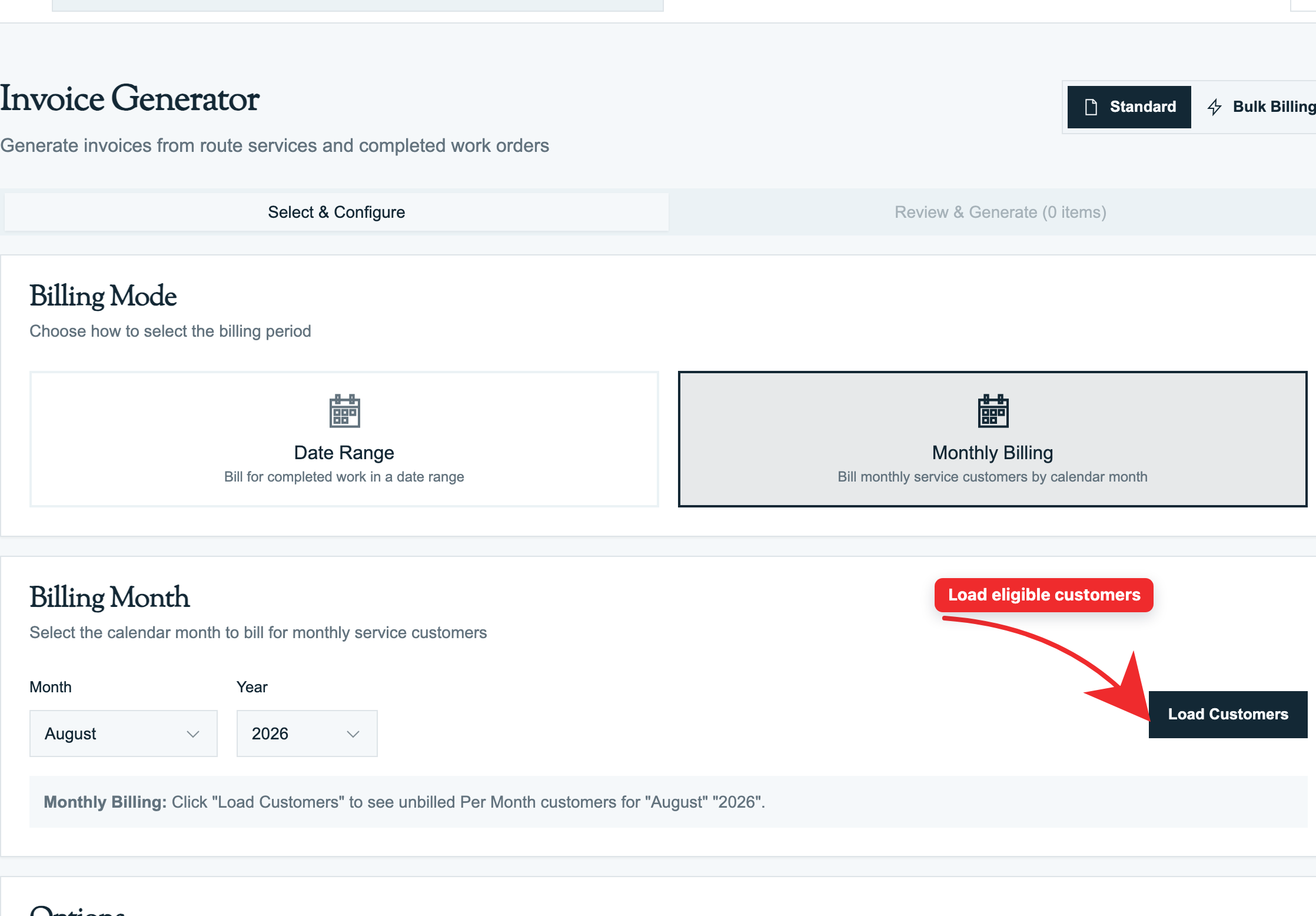
- Billing → Monthly Billing
- Pick the Year and Month you're billing for.
- The page loads all monthly-rate properties grouped by customer:
- Visits this month (count)
- Chemicals applied for Per Month + Chemicals properties
- Estimated total per property
- Already billed properties are shown in a separate section (greyed out, with the existing invoice number).
- Optionally filter by customer or property.
- Toggle Combine per Customer if multi-property customers should get one combined invoice.
- Set the Default Message, such as "Thank you for choosing us for this month's service."
- Click Generate Invoices.
Pool Runs creates one invoice per property, or per customer when combined, and shows a summary of successful invoices and any errors.
What Gets Onto a Monthly Invoice
For a Per Month property:
| Line | Charged? | Why |
|---|---|---|
| "Monthly Service — March 2026" | $150 | The property's monthly rate |
| Visit 1 (Mar 5) | $0 (informational) | Included in the monthly rate |
| Visit 2 (Mar 12) | $0 (informational) | Included |
| Visit 3 (Mar 19) | $0 (informational) | Included |
| Visit 4 (Mar 26) | $0 (informational) | Included |
| Liquid Chlorine — 24oz | $0 (informational) | Chemicals included |
For Per Month + Chemicals:
| Line | Charged? |
|---|---|
| "Monthly Service — March 2026" | $150 (the monthly rate) |
| Visits | Informational |
| Liquid Chlorine — 24oz | $4.32 (charged) |
| Muriatic Acid — 8oz | $1.60 (charged) |
An Informational line appears without a charge. The customer sees what they received, while the total does not double-count it.
Double-Billing Prevention
Pool Runs remembers each property and month combination that has been billed, then skips it on later runs for the same month. If you void the invoice, the property can be released for billing again.
Autopay
Autopay is the customer-side feature that stores a payment method and auto-charges new invoices on the due date.
How Customers Enroll
Two paths:
Path 1: Customer self-enrolls via portal or invoice link
- Customer pays an invoice via Stripe.
- On the payment confirmation page, a checkbox: "Save this card and enable autopay for future invoices."
- Customer checks it. Stripe stores the payment method on the connected account.
- Pool Runs marks the customer's autopay enrollment Active.
Path 2: Office-staff enrolls a customer
- From the customer profile, click Autopay → Enroll.
- The customer is sent a one-time setup link to add a payment method.
- They click, enter card details on a Stripe-hosted page, and submit.
- Enrollment is active.
What Autopay Does
When a new invoice is created and the customer is autopay-enrolled:
- The invoice shows that autopay is scheduled.
- On the due date, or the configured number of days before it, Pool Runs initiates a Stripe charge using the saved payment method.
- The invoice shows the autopay attempt as pending, processing, succeeded, or failed.
- On success, Pool Runs records the payment, moves the invoice to Paid, and Stripe sends the customer a receipt.
- On failure, retries kick in based on org settings.
Reminder Emails
Org settings include:
| Setting | Default | Purpose |
|---|---|---|
| Enable autopay | On | Master toggle for your business |
| Send reminders | On | Send a reminder before charging |
| Reminder timing | 3 days | "Your card on file will be charged in 3 days" |
| Retry attempts | 3 | How many times to retry after a failure |
| Retry interval | 2 days | Days between retries |
The reminder email gives the customer a chance to update their card if it's expiring or to cancel autopay before the charge.
Failed Autopay
If the stored card is declined (expired, NSF, fraud block), Pool Runs:
- Records the failed attempt and reason on the invoice.
- Updates the retry count for the autopay enrollment.
- Schedules a retry per the org's retry settings.
- After the maximum retries, marks the enrollment Failed and notifies the office.
- Sends the customer a "we couldn't charge your card — please update" email with a link.
The invoice remains Sent (or Overdue after the due date passes) until paid. Office staff can manually retry, ask the customer to update their card, or fall back to manual collection.
Autopay Status Indicators
| Status | What it means |
|---|---|
| Active | Card on file; autopay will charge new invoices |
| Paused | Customer paused autopay |
| Failed | Maximum retries reached; needs office intervention |
| Cancelled | Customer or office cancelled the enrollment |
The invoice list and detail pages show an autopay badge so staff know which invoices are on autopay vs. manual collection.
Billing Run History
Every batch from the Invoice Generator or Monthly Billing appears in the billing run history. It shows who ran the batch, when it ran, which filters were used, and what was generated.
Use Cases
- Review everything from a specific monthly run
- "We had a bug — void everything from yesterday's run" (planned feature)
- Reporting: which batches generated which revenue
Concepts
Why Stripe Connect for autopay
Pool Runs uses Stripe Connect, meaning each org has its own connected Stripe account. The customer's stored card lives on the org's Stripe account, not on Pool Runs' account. This means:
- Funds go directly to the org's Stripe balance
- The org pays Stripe fees, not Pool Runs
- If Pool Runs ever loses access to Stripe data (unlikely), the org's relationship with their customers is intact
- PCI compliance is Stripe's burden, not the org's or Pool Runs'
When monthly billing is wrong
Some orgs use Monthly Billing for the office workflow but charge per-visit pricing. This is a mismatch — you'd see all visits as informational ($0) and only the monthly line charged. Symptom: customers complaining that their bill doesn't match the visit count.
Fix: change the rate type to Per Stop and use the Invoice Generator, or change it to Per Month and confirm the billing change with the customer.
Industry context: monthly vs. per-visit
| Pricing model | Common for | Pros | Cons |
|---|---|---|---|
| Monthly flat | Residential, vacation rentals | Predictable revenue, simpler customer billing | Bad weather months feel like a loss |
| Per visit | New customers, commercial | Direct value-to-cost link | Variable revenue, more billing friction |
| Monthly + chemicals | Premium residential | Predictable base + chemical pass-through | Customers occasionally dispute the chemical line |
Most pool companies start per-visit and migrate customers to monthly as they prove out — Pool Runs handles either gracefully. The nuance is that the Monthly Billing UI is optimized for the monthly variant; per-visit recurring billing is best handled via Invoice Generator on a monthly schedule.
FAQ
Q: A customer has three monthly-rate properties. Can I send one combined invoice for all three? A: Yes — toggle Combine per Customer in Monthly Billing. They get one invoice with three property sections, one total. If left off, they get three separate invoices.
Q: Can autopay charge before the due date? A: Yes. Set Days Before Due on the autopay enrollment. The default is 0, which charges on the due date; set it to 3 to charge three days earlier.
Q: What if a customer is autopay-enrolled but I send them a manual invoice (not from monthly billing)? A: The same flow applies. A new invoice for an autopay-enrolled customer is scheduled to charge on its due date. To skip autopay for one invoice, turn off autopay on that invoice before the charge date.
Q: A customer's card is on autopay but they want to use a different card for one specific invoice. How? A: They can pay the invoice manually via the public payment link before the autopay charge runs — manual payment short-circuits autopay. Once a payment exists for the invoice, autopay is skipped.
Q: How do I cancel a customer's autopay? A: From their profile → Autopay → Cancel Enrollment. The customer is notified. Their card on file is removed from Pool Runs (the card itself remains on Stripe, but Pool Runs no longer references it). Future invoices will not be auto-charged.
Q: An invoice was created Mar 15 and the autopay reminder went out Mar 20 (3 days before Mar 23 due). The customer didn't update the card and it failed. What happens?
A: Per org settings: 3 retry attempts, 2 days apart. Mar 25, Mar 27, Mar 29 retries. After Mar 29 the enrollment is failed and the invoice goes to manual collection. The customer gets four notification emails (initial reminder, then one per failure).
Q: Can a per-stop customer have monthly autopay? A: Yes — autopay is independent of rate type. Rate type controls how the invoice is calculated; autopay controls how it gets paid. A per-visit customer's monthly invoice (generated via Invoice Generator) can still autopay.
Troubleshooting
Monthly Billing shows zero customers. You have not set any properties to a monthly rate, or the selected month is too far in the future. Check each property's service pricing.
A property is showing as "already billed" but the invoice was voided. Voiding an invoice should release the property for billing again. If it still appears as already billed, check the property profile or contact support to clear the old billing record.
Autopay charged the wrong amount. Pool Runs charges the invoice total after adjustments and tax. If the amount is wrong, check the invoice's line items, adjustments, and tax calculation, then refund the overcharge and correct the invoice.
Customer says they enrolled in autopay but I don't see it. Two possibilities: (a) they tried but the Stripe setup didn't complete (look for pending enrollments); (b) they enrolled on a different invoice's payment page and Stripe's notification didn't reach Pool Runs. Check the Stripe dashboard for the customer's payment methods on your connected account.
Reminder email didn't send. Either reminders are turned off for your account, or the customer's email is missing. Check both. Reminders go out once a day — contact support if it's been longer than that.
The "Already Billed" list shows an invoice number that doesn't exist. Contact support. A billing record may need to be cleared before the property can appear in Monthly Billing again.
Related Articles
- Invoices Overview — How monthly rates and informational lines work
- Invoice Generator — Bulk billing for any rate type, any date range
- Recording Payments — How autopay charges create payment rows
- Invoices Overview: Sending Invoices — Reminder emails and resend behavior
- Handling Payment Issues — When autopay fails and how retries work
- Collections — Recording manual payments and writing off uncollectible balances
- Customer Profiles — Where autopay is enrolled and managed
- Properties — Where rate type is configured
Need help? Check our troubleshooting guide or contact support.
Invoice Generator
Select completed work or a billing month, review service lines and adjustments, preview the PDF, and create invoice records with the appropriate billing action.
Invoice Adjustments — Discounts, Credits, Voids & Refunds
How to add discounts and fees to an invoice, void or cancel an invoice, issue refunds, and apply customer credits in Pool Runs.