Quotes
Estimates and customer-facing approvals in Pool Runs — drafting, sending, signing, and converting to invoices or work orders.
Quotes
A quote in Pool Runs is a written estimate you send to a customer before the work happens. Repairs, equipment swaps, salt-cell replacements, green-pool rescues, spring openings — anything outside the regular weekly route belongs in a quote. Once the customer approves it (online, with an e-signature), Pool Runs locks in the price and gives you one click to turn that approval into a deposit invoice, a work order, or a final invoice.
Quotes on Mobile
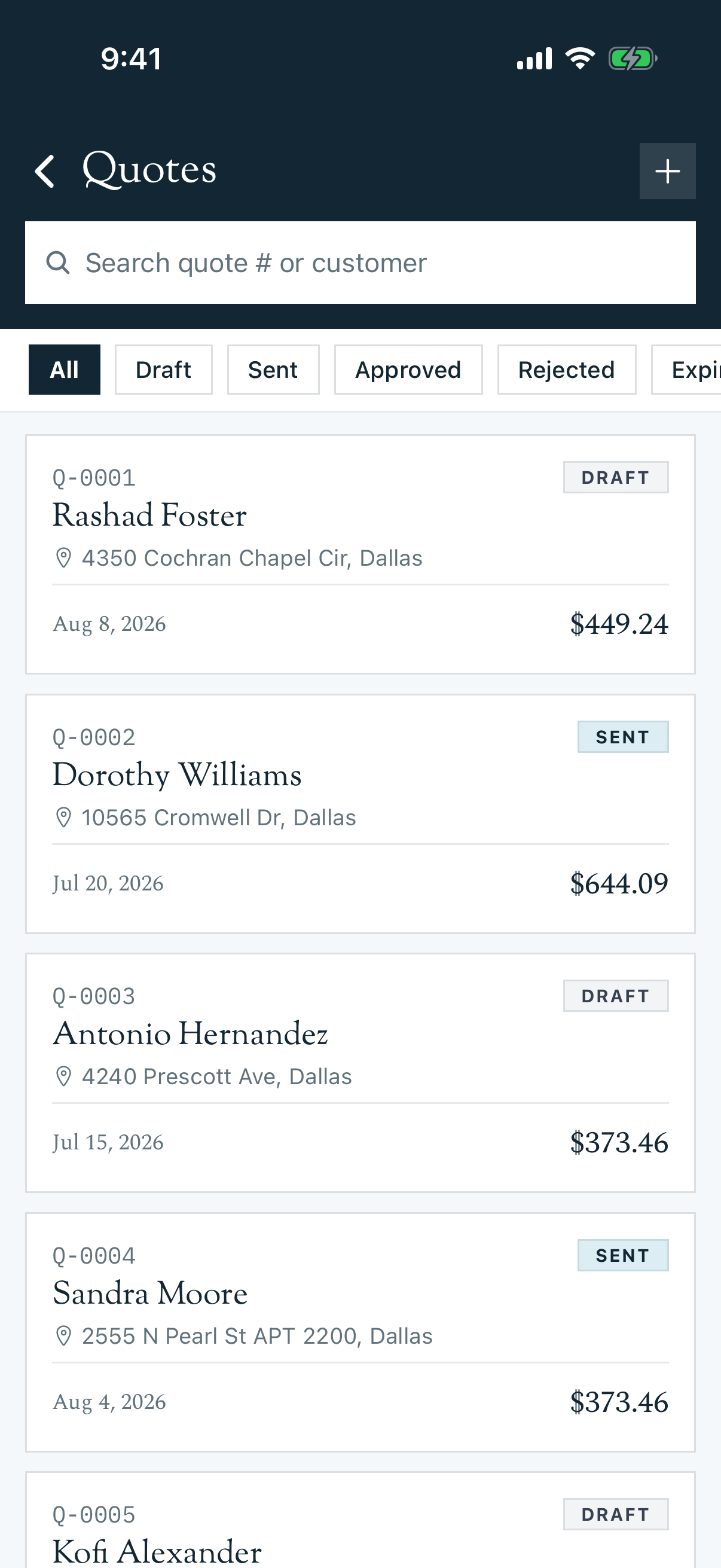
The mobile app supports the full quote lifecycle for authorized staff. Open More → Quotes to search and filter, create a quote, preview it, collect an on-site signature, send or resend it, share the approval link, edit a draft, record approval, revise a sent quote into a new draft, or void it. After approval, you can create the work order or invoice directly from the quote detail screen.
Each action follows the same quote permissions as the web app, so a technician may be able to view a quote while office staff see the financial and status-changing controls.
In This Section
- Quotes Overview — What a quote is, how it differs from an invoice, and the lifecycle from draft to paid.
- Creating a Quote — The full quote builder (customer, line items, taxes, discounts, deposits, terms), plus editing drafts, expirations, and the Void & Recreate flow for sent or approved quotes.
- Sending a Quote — Email delivery, the secure customer link, what customers see when approving, the e-signature flow, and the manual-approve fallback.
- Converting a Quote — One-click conversion to a deposit invoice, a final invoice (with deposit credit), or a work order.
Where Quotes Fit in the Pipeline
Lead → QUOTE → Customer Approves → Deposit Invoice → Work Order → Final Invoice → Payment| Connected To | What it means |
|---|---|
| Customers | Every quote is tied to one customer. The customer's primary email is where the approval link goes. |
| Properties | Optional. If the work happens at a specific service address, attach the property so the work order can be scheduled correctly. |
| Work Orders | An approved quote can spawn a work order in one click. The line items become the scope of work. |
| Invoices | Approved quotes can generate a deposit invoice (if a down payment was set) and/or a final invoice. Invoices remember their source quote. |
Quick Reference: Quote Statuses
| Status | What it means | Customer can approve? | Editable? |
|---|---|---|---|
| Draft | Being built in the office. Not sent yet. | No | Yes — full edit |
| Sent | Emailed to the customer. Approval link is live. | Yes | No (use Void & Recreate) |
| Approved | Customer signed off. Locked in. | Already done | No (use Void & Recreate) |
| Rejected | Customer or staff marked it as declined. | No | No |
| Expired | Past the expiration date without approval. | No | No |
| Void | Cancelled by staff. Approval link invalidated. | No | No |
See Quotes Overview for the full state machine.
Tip: If you constantly re-quote the same job (salt cell replacement, filter clean, spring open), invest time in your Parts, Chemicals, and Services catalogs under Settings — they store the description, default unit price, and tax behavior so adding them to a new quote is a one-click pick. There is no formal "save as template" feature today.
Common Workflows
A homeowner needs a salt cell replaced
- Create a quote, attach the customer + property
- Add the salt cell as a part line item, add labor as a service line item, set tax-applicable flag per item
- Set a 50% deposit and 30-day expiration
- Send. The customer gets an email with a magic link to view, sign, and approve.
- On approval, generate a deposit invoice and a work order in two clicks.
A commercial customer requests a written estimate for spring opening
- Create a quote with all anticipated items (drain, clean, refill, chemicals, equipment check)
- Add a 10% volume discount as a discount adjustment
- Set "Terms" to "50% deposit; balance due upon completion"
- Send and await approval. The activity log shows when they viewed it.
Related Sections
- Invoices — The downstream financial document a quote turns into
- Work Orders — How approved quotes become scheduled labor
- Customer Profiles — Where you can see a customer's full quote history
Billing
The full billing lifecycle in Pool Runs — quotes, work orders, invoices, payments, and (optionally) the QuickBooks Online integration. Pick the setup that matches how you keep books.
Quotes Overview
What a quote is in Pool Runs, how it differs from an invoice, and the full lifecycle from draft to converted.