Collections
How to log payments received outside Stripe (cash, check, Zelle, Venmo) in Pool Runs, and how to handle past-due accounts using the tools that exist today.
Collections
Pool service is a high-touch trade. Many customers — especially commercial — pay by check rather than card. Some pay by Zelle or Venmo because they don't trust online card forms. And some don't pay at all. This section covers how to log payments that come in outside Stripe, and what tools Pool Runs gives you for past-due accounts today.
In This Section
- Manual Payment Recording — Logging cash, checks (with check number), Zelle, Venmo, CashApp, wires, and "other" payment methods.
What Pool Runs Supports for Collections Today
| Capability | Pool Runs supports |
|---|---|
| Recording check payments with check # | Yes — method: Check, reference: check # |
| Recording cash, Zelle, Venmo, CashApp | Yes (Zelle/Venmo/CashApp use "Other" with reference) |
| Recording ACH paid outside Stripe | Yes — method: ACH |
| Per-customer payment summary | Yes — Customer profile shows Invoiced / Paid / Due totals |
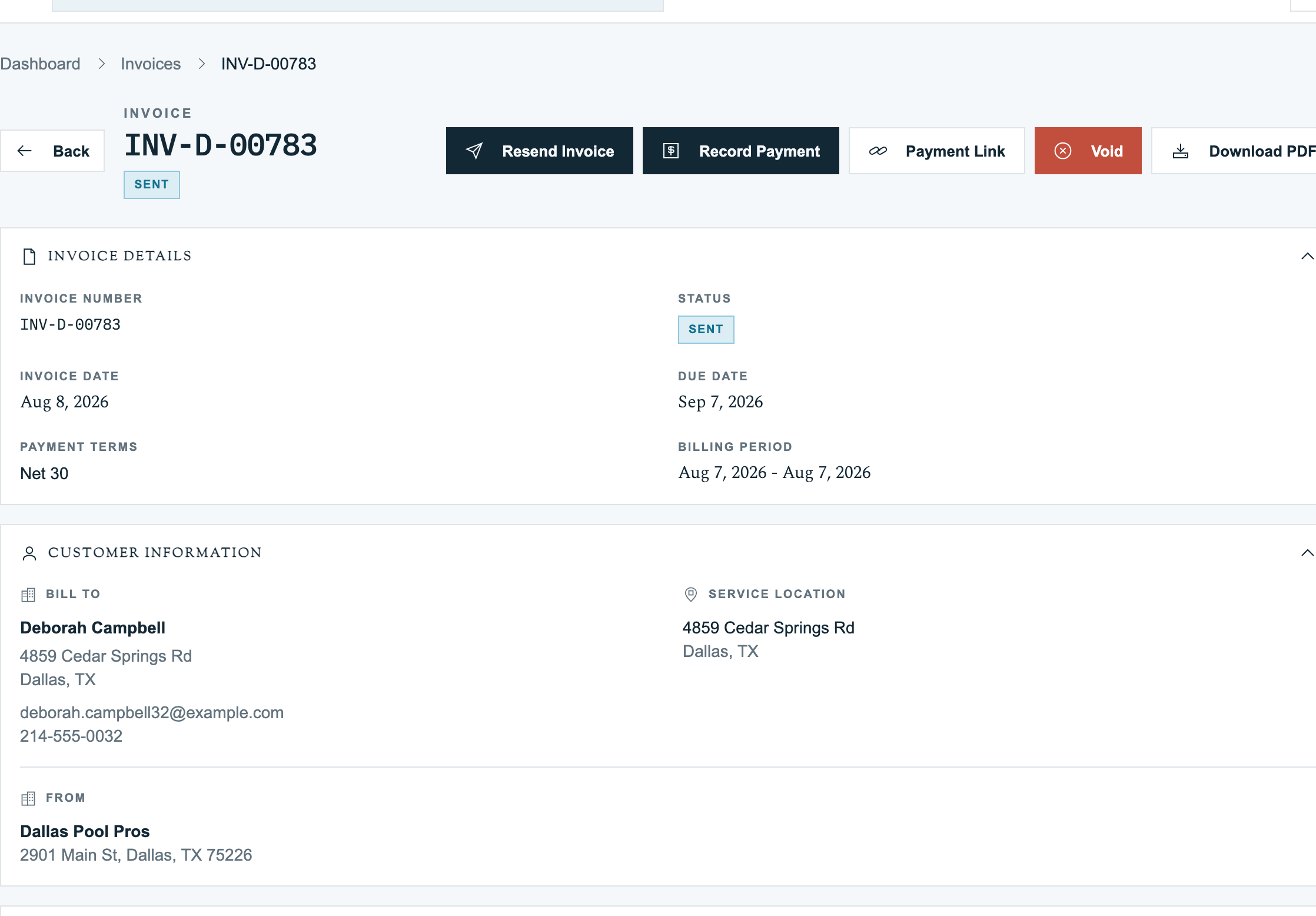
| Resending an invoice as a reminder | Yes — Resend Invoice on the invoice detail page |
| Adding a late fee as a line item | Yes — manual line item on the next invoice (see Creating Invoices) |
| Adding a fee/discount adjustment to an invoice | Yes — see Invoice Adjustments |
| Voiding an invoice with a reason | Yes — Void on the invoice detail page |
| Automated dunning cadence (3-day, 10-day, etc.) | No |
| A/R aging report grouped by days overdue | No — export the invoice list for analysis, or use QuickBooks |
| Dedicated "Send Reminder" button | No — use Resend Invoice |
| Promise-to-pay date field | No — use invoice notes |
| Collections agency integration | No |
| Automated late fee assessment | No — manual line item only |
| Dedicated "written off" invoice status | No — use a credit/discount adjustment to zero out the balance, or void the invoice |
| Phone-call logging UI | No — use invoice notes |
| "Pause Service" button | No — remove the property from active routes |
Common Workflows
Logging a Mailed Check
- Open the invoice → Record Payment
- Method: Check
- Amount: amount on the check
- Reference: check number
- Notes: e.g., "Received by mail Apr 15"
- Save → invoice flips to
paid
Resending an Invoice as a Reminder
- Open the past-due invoice
- Click Resend Invoice (top right)
- The customer receives the same invoice email again with a fresh payment link
There is no separate "Send Reminder" button or reminder-template picker. The same invoice email is used to resend.
Adding a Late Fee
Pool Runs does not auto-assess late fees. Add the fee manually on the next invoice as a line item — for example, "Late fee — INV-1042 past due 30 days" — or use the fee adjustment field on the past-due invoice itself. See Creating Invoices and Invoice Adjustments.
Writing Off an Uncollectible Account
Pool Runs does not have a "written off" invoice status. To close out an uncollectible balance:
- Apply an offsetting credit/discount adjustment equal to the remaining balance — this zeros out the net due. See Invoice Adjustments.
- Or void the invoice with a reason like "Bad debt — uncollectible 2026-04-15" via the Void button on the invoice detail page.
Reflect the bad-debt accounting in QuickBooks separately (your bookkeeper typically posts a Bad Debt Expense journal entry at month-end).
Related Sections
- Payments — Stripe-side payments (the automatic side).
- Recording Payments — Foundation page covering payment record basics.
- Invoice Adjustments — Discounts, credits, fees, voids.
- QuickBooks Integration — How payments and voids flow to accounting.
- Customer Profiles — Per-customer billing and payment history.
Handling Payment Issues
How Pool Runs handles declined cards, ACH bounces, autopay failures, and refunds — permanent vs. temporary failures, the retry schedule, and the refund flow.
Manual Payment Recording
How to log payments received outside Stripe — cash, mailed checks, Zelle, Venmo, CashApp, wire transfers, and applied credit. The full Record Payment workflow with field-by-field guidance.