Recording Payments
How payments work in Pool Runs — manual entry (cash, check, ACH), online Stripe payments, partial payments, and the payment status lifecycle.
Recording Payments
A payment in Pool Runs is a separate record from the invoice — every dollar received is its own row, attached to one invoice. This separation is what makes partial payments, multiple-payment-method scenarios, and refunds clean. This page walks through every way payments enter the system: cards, ACH, cash, check, applied credit, manually-entered, online-paid, partial, and full.
How Payments Work
The model is simple:
- A generated invoice has a fixed total.
- Each payment records the amount, method, status, and date.
- An invoice can have many payments. The sum of
succeededpayments determines the invoice's paid status.
| Sum of succeeded payments | Invoice status |
|---|---|
| 0 | sent, viewed, or overdue |
| Greater than 0 but less than total | partial |
| Equal to total | paid |
| Greater than total | paid (overpayment — see FAQ) |
When an invoice moves from Partial to Paid, Pool Runs records the paid date and triggers any related autopay or customer-portal updates.
Quick Steps (Manual Payment)
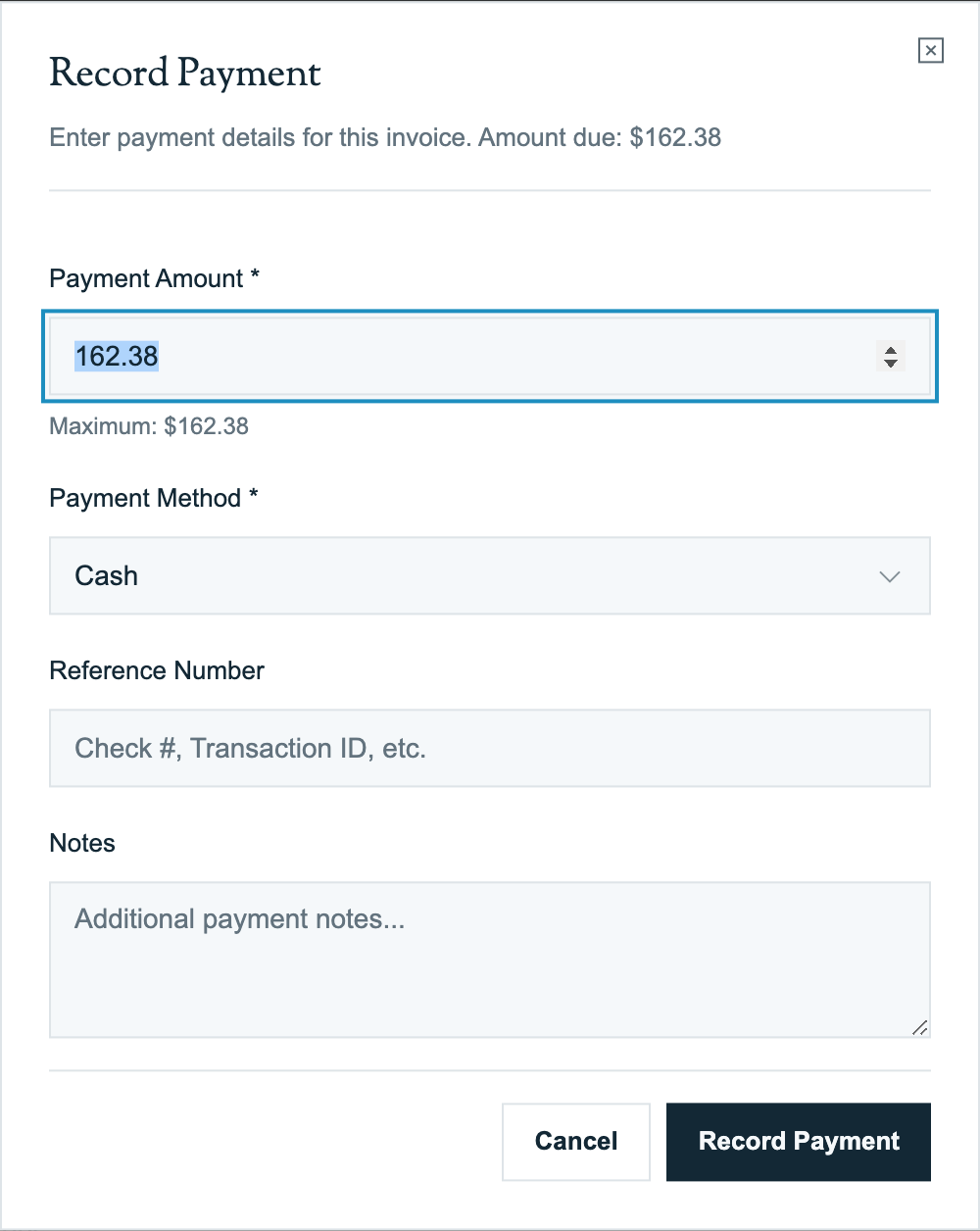
- From the invoice detail page, click Record Payment.
- Enter the Amount (defaults to the remaining balance).
- Select Payment Method: Cash, Check, Credit Card, ACH, Wire Transfer, Applied Credit, or Other.
- Set Payment Date (defaults to today).
- Optionally add a Reference Number (check #, transaction ID, etc.).
- Optionally add Notes.
- Click Save.
The payment appears in the invoice's payment history. Invoice status updates immediately.
Payment Methods
| Method | When to use | Reference number |
|---|---|---|
| Cash | Customer hands you cash | Optional (e.g., "Receipt #1234") |
| Check | Customer mails or hands you a check | Check number |
| Credit Card | Card swiped offline (manually entered, not Stripe) | Last 4 digits or auth code |
| Debit Card | Same as credit card, offline | Last 4 digits |
| ACH | Bank transfer manually arranged | Bank reference / trace ID |
| Wire Transfer | Wire received | Wire confirmation number |
| Stripe | Online payment via the public link or autopay | Recorded automatically |
| Applied Credit | Customer has a stored credit balance, applied to this invoice | Source credit ID |
| Other | Anything else | Free text |
The Stripe method is automatic. When a customer pays online or autopay charges them, Pool Runs records the amount, date, payment method, and receipt link for you.
The Payment Status Lifecycle
pending → processing → succeeded
                    ↓
                  failed
                    ↓
Partially Refunded → Refunded| Status | What it means | Counts toward invoice paid? |
|---|---|---|
pending | Payment initiated, not confirmed | No |
processing | Stripe is working on it (ACH takes 3–5 days) | No |
succeeded | Payment completed | Yes |
failed | Card declined, NSF, etc. | No |
refunded | Fully refunded | No (subtracted) |
| Partially Refunded | Some money returned; the remaining payment still stands | Partially |
Manual payments (cash, check) skip pending/processing and go straight to succeeded. Stripe card payments are typically pending for a fraction of a second before succeeded. ACH starts at processing and stays there for 3–5 business days before succeeded or failed.
Partial Payments
A partial payment is any payment below the remaining balance. After the first partial payment, the invoice status changes from Sent to Partial.
| Scenario | What to do |
|---|---|
| Customer paid $100 of a $237.50 invoice | Record payment for $100. Invoice status: partial. Remaining: $137.50. |
| Customer pays the remaining $137.50 next month | Record another payment for $137.50. Status: paid. |
| Customer overpays by $20 | Record $257.50. Status: paid. The $20 becomes account credit (or sit as overpayment — see FAQ). |
The customer-facing payment page (when paying online) defaults to the remaining balance but allows them to enter any amount up to that balance. If a down-payment minimum is set, they have to meet that amount on the first payment but no minimum on subsequent ones.
Online Payments (Stripe)
When a customer pays via the public payment link or autopay, Pool Runs:
- Sets up a secure payment session with Stripe when the invoice is sent.
- The customer enters their payment method on the Stripe-powered payment page (card, bank, Link, Apple Pay, Google Pay).
- Stripe processes the payment and notifies Pool Runs.
- Pool Runs records the successful payment and adds a link to the receipt.
- The invoice status updates to Paid (or Partial for partial pays).
- The customer gets a Stripe-hosted receipt email automatically.
The payment details show the method used, the amount and date, and a link to the Stripe receipt. Pool Runs keeps the information needed for refunds and reconciliation automatically.
If a Stripe payment fails, the invoice does not progress. The customer sees the reason on the payment page and can retry with a different card or payment method.
Failed Payments
Common Stripe failure codes:
| Code | Meaning | Customer action |
|---|---|---|
| Card declined | The card issuer declined the charge | Try a different card or contact the issuer |
| Insufficient funds | The account has insufficient funds | Add funds or use a different method |
| Expired card | The card is expired | Use a current card |
| Incorrect security code | The security code does not match | Re-enter it |
| Processing error | The payment could not be processed | Retry |
| Authentication required | The bank requires an extra verification step | Complete the verification prompt |
Failed attempts stay in the invoice's payment history but do not count toward the paid total. The customer can retry with another payment method.
Concepts
Why payments are separate from invoices
Pool Runs keeps each payment as a separate history entry because:
- Partial payments are common (commercial customers, deposit + final, layaway-style)
- Refunds need their own audit trail (who refunded, why, when, how much)
- Multiple payment methods on one invoice (e.g., $100 check + $137.50 card) are explicit
- Failed payments can be retried without polluting the invoice's history
Applied Credits
Some invoices are settled (in part or full) by applying an existing customer credit. Common scenarios:
- Customer had a credit memo last month, this month's invoice deducts from it
- Customer overpaid an earlier invoice, the surplus is now stored credit
When you record an Applied Credit payment, the credit balance on the customer's profile decreases by the amount applied. If automatic credit application is enabled, Pool Runs applies stored credit to new invoices for you.
Stripe Connect
Pool Runs uses Stripe Connect, meaning each org has its own connected Stripe account. Payments go directly to your Stripe balance (not to Pool Runs first), and standard Stripe fees apply (2.9% + $0.30 for cards, 0.8% capped at $5 for ACH). You can pass these fees through to commercial customers as a "Service Fee" adjustment if you want.
The Recorded-By Field
Every manual payment records who entered it. The invoice's payment history shows who recorded each payment — a key audit trail for cash and check handling.
FAQ
Q: A customer paid me $20 too much. What do I do? A: Record the full payment amount received. The invoice moves to Paid, and the overage becomes customer credit. It can apply automatically to the next invoice when automatic credits are enabled, or you can apply it manually. You can also refund the $20; see Invoice Adjustments.
Q: I recorded a cash payment for the wrong invoice. Can I move it? A: Not directly. Remove or refund the payment on the wrong invoice, then record it on the correct invoice. The invoice histories preserve both actions.
Q: The customer paid via Stripe but I also want to mark a "service fee" as paid separately. A: Stripe payments come in as a single charge for the invoice's total. If you have a service fee broken out as an adjustment line, the customer sees and pays it as part of the same total — no separate accounting needed.
Q: ACH says "processing" for 4 days. Can I close the books before it clears?
A: ACH risk: the bank can return it as failed up to 3–5 business days later. Best practice is to wait for succeeded before treating the payment as final. The invoice will stay partial (or sent) during processing, which is technically accurate.
Q: How do I record a payment received before the invoice was created? A: Create the invoice with the correct issue date, then record the payment using the date the funds were received. The payment date can be earlier than the invoice date for a deposit.
Q: Can I record a payment without sending the invoice?
A: Yes. The invoice needs to be at least generated (have an invoice number). A manual cash/check payment doesn't need the invoice to be sent. The status will jump from generated → paid directly.
Q: What's the difference between cancelled, void, and refunded?
A: Cancelled = invoice was never paid, retracted before any money moved (status of the invoice). Void = invoice was sent and possibly viewed but is now retracted (status of the invoice; preserved for history). Refunded = payment was made and is now being returned (status of the payment, not the invoice — though a fully refunded invoice may have its own status of refunded). See Invoice Adjustments.
Troubleshooting
Stripe payment missed — payment shows "succeeded" in Stripe dashboard but not in Pool Runs. Sometimes a completed Stripe payment takes a few minutes to appear in Pool Runs. Wait briefly, then contact support if it is still missing. Avoid recording the payment a second time unless support confirms that you should.
The "Record Payment" button is disabled.
The invoice is draft (no invoice number yet — generate first), void, or cancelled. Drafts can't take payments; voided/cancelled invoices need to be resurrected as a new invoice.
Recorded a payment but the invoice still says "sent" not "paid."
Either the payment status is pending / processing (not succeeded), or the amounts don't reconcile (e.g., adjustment math mismatch, stale balance). Refresh the page; if it persists, open the invoice's payment history to see each payment's status.
Customer says their card was charged but Pool Runs shows nothing. Check the Stripe dashboard for the payment. If it succeeded there but not in Pool Runs, wait a few minutes and contact support with the invoice number and payment date.
Payment amount won't accept decimals. The amount field accepts up to 2 decimals (cents). If you're typing a 3rd decimal, it rounds. For sub-cent precision (rare), contact your accountant — most pool service billing operates in whole cents.
Related Articles
- Invoices Overview — How invoice status reacts to payments
- Invoices Overview: Sending Invoices — How online payments are initiated
- Invoice Adjustments — Refunds, credits, and voids
- Recurring & Auto Invoicing — Autopay automatically charges invoices
- Collections — Manual payment recording, late fees, and write-offs
- Customer Profiles — Where stored credit balance lives
- QuickBooks Integration — Where payments sync after recording
Need help? Check our troubleshooting guide or contact support.
Invoice Adjustments — Discounts, Credits, Voids & Refunds
How to add discounts and fees to an invoice, void or cancel an invoice, issue refunds, and apply customer credits in Pool Runs.
Payments
How money actually moves through Pool Runs — online card and ACH payments via Stripe, autopay, payouts to your bank, refunds, disputes, and the public payment page.