Route Generation (Web)
How Pool Runs turns recurring schedules into daily route stops — automatic generation, Days Ahead, permission-dependent Generate Now, removed-visit confirmation, and service-completion rules.
Route Generation (Web)
Download video · Captions (VTT) · Transcript (TXT)
A route assignment is the rule ("Tom services 1234 Maple every Tuesday"); a route stop is the actual visit on a specific date. Generation is the bridge: the automatic process reads your assignments and scheduled work orders and creates the stops that show up on the Schedule and on each tech's app.
How Generation Runs
- Automatic generation runs at your configured hour in the organization's timezone. It fills new dates inside your future horizon and skips dates already generated.
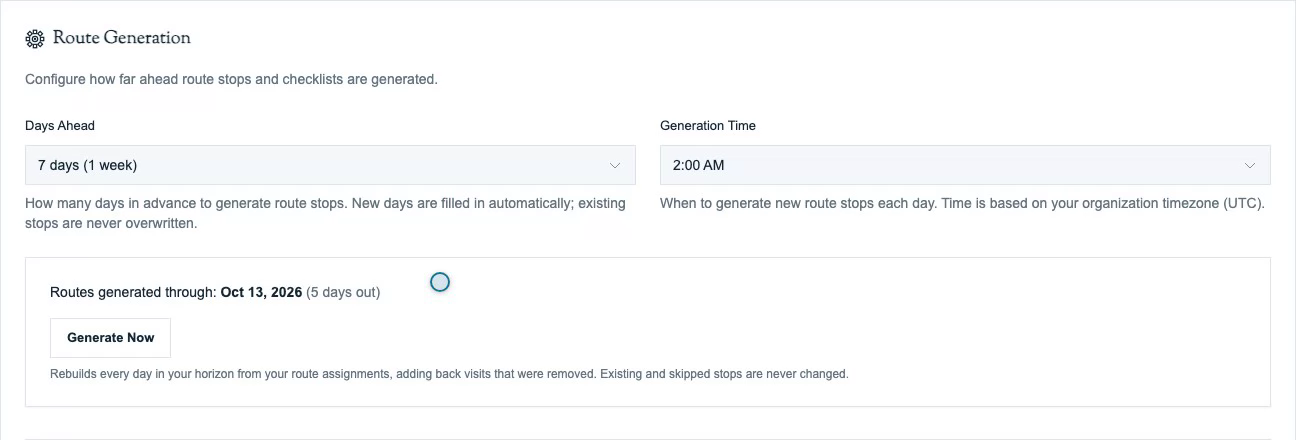
- Generate Now is the manual trigger in Settings → Routes. Read the description beneath the button: its behavior depends on your route permissions.
For users allowed to create and edit routes and manage all technicians' routes, Generate Now fills gaps across the horizon, including dates already generated. It can add back removed recurring visits that still belong to an active assignment. Existing stops, including skipped stops, stay unchanged. Other permitted users generate new dates only, preserving removed visits.
Settings → Routes
- Days Ahead — choose 1, 3, 7, 14, 21, or 30 future days. The default is 7 days; the horizon starts tomorrow. A shorter horizon means less to review after a rule change.
- Generation Time — the hour the automatic run uses, in your organization's timezone (default 2:00 AM). The timezone is shown beneath the field.
- Routes generated through — the latest future stop date currently on the schedule. This status does not prove every date or assignment inside the horizon has a stop.
Review Removed Visits Before Generating
When Generate Now would restore removed recurring visits, a confirmation lists their dates, technicians, and customers. Review that list before choosing Generate and add back, or choose Cancel to leave the schedule unchanged.
If no removed visits need restoring, Generate Now can run immediately without a confirmation. If the removed-visit list cannot load, refresh the page and try again. If the list changes after you reviewed it, Pool Runs asks you to review the updated list before generating.
Tip: To keep one visit off the schedule, mark it skipped instead of removing it. To stop recurring service, end its route assignment. Removing a visit alone does not end the assignment.
Service Completion Rules
The Service Completion section controls what a tech must do before completing a stop in the app.
- Require Chemical Data — require at least one chemical reading or dosage before completion. Use the per-chemical requirements below when particular readings are needed.
- Reading Requirements — per chemical: Optional, Every visit, or After X visits.
- Swim Wait Time — select chemicals that trigger a swim-wait notice in service emails. Enable the corresponding block in the service-email template to include it.
These rules produce the completion guard techs see in the field — see Running a Stop.
Adjusting Generated Stops
Do day-to-day changes on the Schedule page. Move or reorder a stop, adjust its appointment time, or mark it skipped when service will not happen. See Managing Routes for one-time changes versus recurring assignment changes.
Automatic generation preserves removed visits on generated dates. A permitted Generate Now run can restore removed recurring visits, so review its description and any confirmation before using it. It fills missing stops rather than resetting existing stops or throwing away manual changes.
Related
- Recurring Schedules — the rules that drive what generates
- Managing Routes — moving and reassigning stops
- Skip Reasons & Holidays — handling dates that shouldn't generate
- Routes Overview — assignments vs. stops
Recurring Schedules (Web)
Choose a service weekday and recurring frequency, set the start and end dates, save the assignment, and verify the dated visits on Schedule.
Skip Reasons & Holidays (Web)
Configure the skip reasons technicians choose from, route skip alerts to your office, and handle holiday and weather closures.