Payments Overview
How payments work in Pool Runs — when payments record themselves vs. when you record them by hand, the lifecycle from "Pay Now" click to bank deposit, and what's automatic vs. what your office handles.
Payments Overview
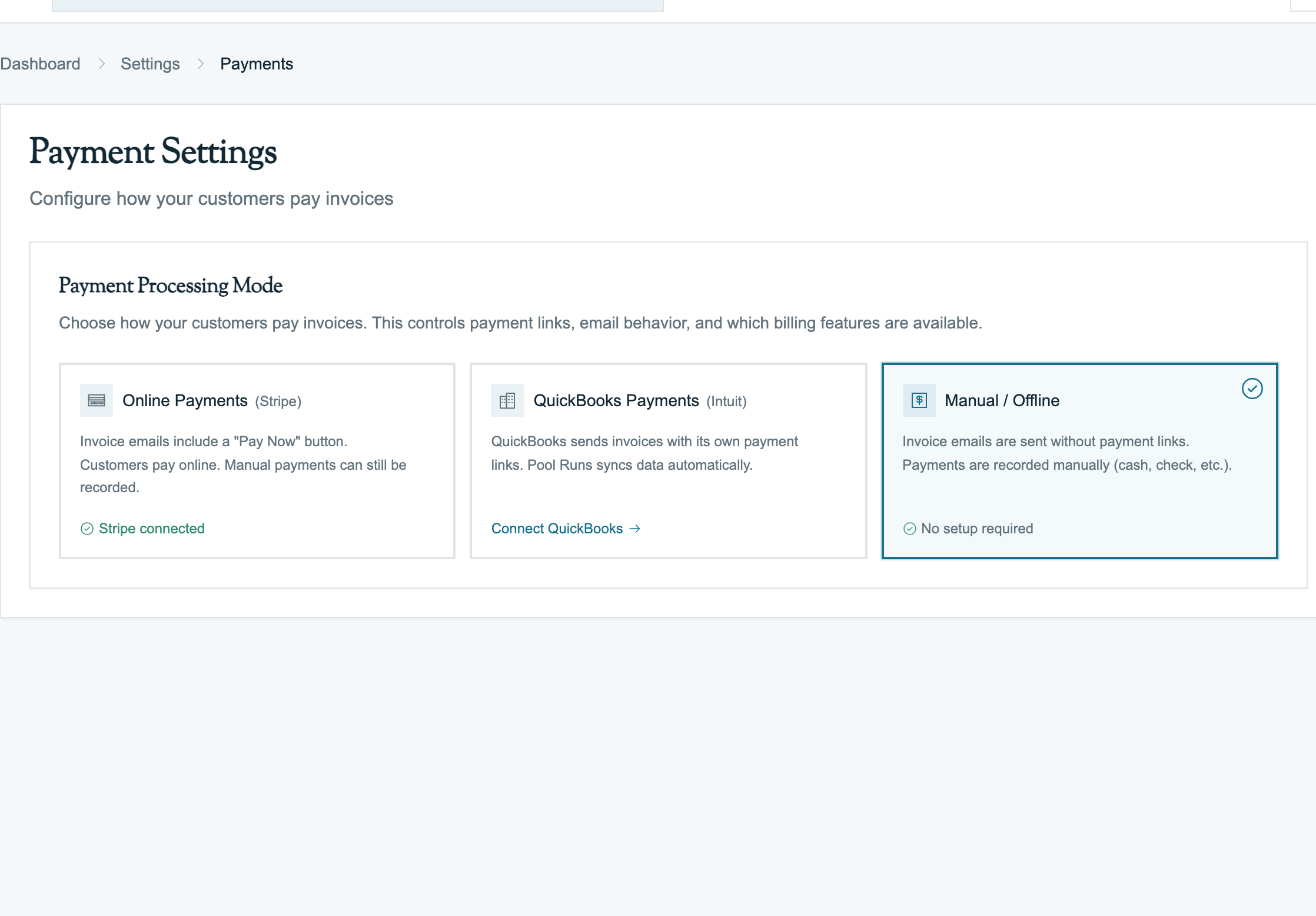
A payment in Pool Runs belongs to one invoice. Whether the money came from a Stripe card charge, a mailed check, or a transfer to your business account, Pool Runs shows the amount, method, status, and date received. This page explains how money moves from the customer to your bank account and where your office may need to step in.
The Two Ways Money Comes In
Pool Runs handles two parallel paths:
1. Online through Stripe
- Customer clicks Pay Now on the public invoice link, in their email, or has autopay scheduled to run
- They enter a card or bank account on the payment page
- Stripe processes the charge into your Stripe account
- Stripe notifies Pool Runs, which:
- Records the payment as succeeded
- Updates the invoice (
partialif some balance remains,paidif zero) - Stamps the paid date
- Sends customer notifications
- The money lands in your bank in about 2 business days via a Stripe payout
This is how most residential pool service customers pay once autopay is enabled — adoption rates of 60–80% are typical. Zero work for your office.
2. Manual Entry
- Customer pays you outside Stripe — check, cash, Zelle, Venmo, wire transfer, in-person card swipe on a different terminal
- Office staff opens the invoice in Pool Runs, clicks Record Payment, fills in method/amount/reference
- Pool Runs records it as succeeded
- Invoice flips to paid, history is logged
This is required for: commercial customers paying by check, residential customers without a card on file, customers who prefer not to pay online, and any historical clean-up.
See Recording Payments for the manual-entry walkthrough and Collections for the operational side of chasing manual payers.
What's Stored on Each Payment
Every payment record carries:
| Field | What it stores | Example |
|---|---|---|
| Amount | Dollar value (positive for payments, negative for refunds) | 237.50 or -50.00 |
| Method | Cash, check, credit card, debit card, ACH, wire transfer, Stripe, applied credit, or other | Stripe |
| Payment date | When the money was received (not when it was logged) | 2026-04-15 |
| Status | Pending, processing, succeeded, failed, refunded, or partially refunded | Succeeded |
| Reference number | Free text (check #, transaction ID, wire confirmation) | 1234 |
| Notes | Operator commentary | "Paid in person Wed 4/15" |
| Receipt link | Stripe receipt for online payments | Open receipt |
For Stripe payments, Pool Runs automatically keeps the information needed for refunds and reconciliation.
The "Pay Now" Lifecycle (Stripe)
This is what happens between the customer clicking Pay Now and the money showing up in your bank:
- Invoice goes out with a payment link (link is good for 90 days)
- Customer opens the link
- Pool Runs renders the payment form (card and bank options; Apple Pay/Google Pay show up automatically when the customer's phone supports them)
- Customer enters payment details and clicks Pay
- Stripe processes the charge
- Pool Runs gets a notification from Stripe — payment is recorded, invoice flips to paid, paid date is stamped
- Customer sees a confirmation page; Stripe emails them a receipt
- About 2 business days later, Stripe sends the money to your bank — Pool Runs records the payout
- Money lands in your checking account
Steps 1–4 are the customer-facing flow. Steps 5–9 are entirely automatic.
The "Record Payment" Lifecycle (Manual)
Manual entry is much shorter:
- Customer pays you (check, cash, Zelle, etc.)
- Open the invoice → click Record Payment
- Fill in: amount, method, date, reference number, notes
- Save → payment recorded as succeeded
- Invoice status updates and paid date is stamped (if fully paid)
- Invoice history note is logged
There's no payout step — the money was already in your account when the customer Zelled you.
When to Use Stripe vs. Manual
A practical decision tree:
- Is the money already in your Stripe balance? It will record itself — don't touch anything.
- Did the money land in your bank some other way? Use Record Payment.
- Cash → "Cash"
- Mailed check → "Check" + check number
- Zelle / Venmo / CashApp → "Other" + reference
- Wire → "Wire Transfer"
- Bank ACH (manually arranged) → "ACH"
- In-person card on Square / Clover → "Credit Card"
- Customer credit balance → "Applied Credit"
The most common error is double-recording: a customer pays via Stripe, the system records it automatically, then office staff also records it manually. The invoice flips to paid with twice the actual amount, books are wrong, customer is confused. Always check the payment history first.
Partial Payments
Both flows support partial payments:
- Stripe: customer enters a custom amount on the payment page (must meet the down-payment minimum if you've set one; can't exceed remaining balance). Invoice flips to
partial. - Manual: enter an amount less than the remaining balance. Invoice flips to
partial.
Once a down payment is met, customers must pay the remaining balance in one shot online (no further partials online — this prevents trickle-pay scenarios).
For deeper coverage of partial-payment math, see Recording Payments.
What Happens When Things Go Wrong
| Event | What Pool Runs does | What you should do |
|---|---|---|
| Card declined | Records the failure on the invoice | Email the customer, ask for a different card. See Handling Payment Issues. |
| ACH bounced (not enough funds in customer's account) | Same as above, but the bounce comes back 3–5 days later | Same — customer needs to fix their bank or pay another way |
| Customer disputes a charge | Stripe sends you a notification by email — Pool Runs does not flag this in-app today | Gather evidence and respond in Stripe Dashboard. If you lose the dispute, click Refund on the original Pool Runs payment to keep the books in sync. |
| You issue a refund | Pool Runs records a negative payment, flips the invoice to refunded if nothing's left to refund | Stripe emails the customer; a heads-up call is good practice |
| Stripe payout fails (your bank rejected it) | Visible in Stripe Dashboard — Pool Runs does not flag this in-app today | Check your bank info in Stripe Dashboard |
| Payment update from Stripe doesn't arrive | Stripe retries for up to 3 days | If many fail, check Stripe's event-delivery log or contact support |
Where Payments Connect
| Connected to | What it means |
|---|---|
| Invoices | Every payment belongs to one invoice. The sum of succeeded payments determines invoice status. |
| Customer Profiles | Saved cards and bank accounts live at the customer level. |
| Autopay | Autopay uses a saved card or bank account to charge on the invoice's due date. |
| Stripe Dashboard | Source of truth for charges, refunds, disputes, payouts. Pool Runs mirrors what's there. |
For where payments end up after they're recorded — Pool Runs only, or also QuickBooks — see your setup guide: Pool Runs + QuickBooks or Pool Runs + Stripe.
Industry Context
A few realities that shape how online payments work in pool service:
- Most residential customers default to autopay when offered — adoption rates of 60–85% are typical for businesses that ask at signup. ACH adoption is lower (~10–20%) because customers are warier of giving bank info.
- Stripe processing fees are 2.9% + $0.30 for cards and 0.8% (capped at $5) for ACH. On a $200 monthly residential invoice, that's $6.10 (cards) or $1.60 (ACH). Across a year, ACH-vs-card on a single account is about $54 difference.
- Commercial customers rarely pay online. Net 30 by check is the norm. Pool Runs' manual entry path is what makes commercial accounts feasible.
- ACH isn't real-time. Funds show as "processing" in the customer portal for 3–5 days. Don't release service or hand over keys until the payment status flips to succeeded.
- Disputes are rare in pool service (~0.05% of charges by industry data) but high-stakes when they happen — typical dispute is a $500–$2,000 repair where the homeowner is unhappy with the work. Pool Runs has no in-app dispute UI; manage disputes in Stripe Dashboard and manually click Refund in Pool Runs if you lose.
FAQ
Q: Does the customer need a Stripe account to pay online? No. The payment form takes their card or bank info one time and processes the charge. Your business name appears on their statement (not Stripe). Saved cards are stored securely by Stripe — the customer doesn't have to manage anything.
Q: Why do I sometimes see "processing" status on a Stripe payment for several days?
That's ACH. Bank transfers take 3–5 business days to clear. The invoice will show as partial (treated as not-yet-paid) until the funds clear. Don't release service or assume payment until status flips to succeeded.
Q: Can I record a payment that exceeds the invoice total?
Yes — overpayments are allowed. The invoice flips to paid and the overage sits on that invoice (it's not auto-converted to customer credit). Apply manually next invoice as Applied Credit if needed.
Q: What happens if a Stripe payment doesn't show up in Pool Runs right away? Stripe retries notifying Pool Runs for up to 3 days. The payment is still real (money moved), it just has not been recorded yet. It often appears after a few minutes once the update gets through. Check Stripe's event-delivery log or contact support if the mismatch persists.
Q: Do I need Stripe to use Pool Runs? No. The manual-entry path works without Stripe — you just won't have online payment links. But you'll lose autopay, easy customer-facing payment, and the 60–80% reduction in collections work that online payments enable. Most pool service businesses connect Stripe within their first week.
Q: Is the customer charged a fee for paying online? Out of the box, no — your business absorbs the 2.9% + $0.30. Pool Runs supports adding a manual "Service Fee" or "Convenience Fee" line item per invoice if you want to pass it through. Surcharge laws vary by state — see Fees & Payouts before doing this in CA, NY, MA, or other restricted jurisdictions.
Troubleshooting
| Symptom | Likely cause | Fix |
|---|---|---|
| Customer paid online but invoice still shows Sent | Pool Runs has not received the completed payment update yet | Wait 1–2 minutes; if it is still wrong, check the payment in Stripe or contact support |
| Manual payment recorded twice | Operator didn't realize Stripe already auto-recorded it | Delete the manual payment row from invoice payment history |
| "Stripe account is not enabled for charges" error | Stripe hasn't finished verifying your business | Settings → Payments → finish setup (Stripe Overview: Connecting Stripe) |
| Customer says payment went through but it's not in Pool Runs | Could be: (a) charge on a different Stripe account; (b) charge on someone else's card; (c) Stripe couldn't reach Pool Runs | Search Stripe Dashboard for the charge; if missing, customer is confused or paid wrong recipient |
Related Documentation
- Stripe Overview — A closer look at how Pool Runs and Stripe work together, including the connection setup walkthrough.
- Recording Payments — Manual entry side.
- Collections — When customers don't pay.
- Pool Runs + QuickBooks — Full lifecycle when QBO is connected.
- Pool Runs + Stripe — Full lifecycle without QBO.
Payments
How money actually moves through Pool Runs — online card and ACH payments via Stripe, autopay, payouts to your bank, refunds, disputes, and the public payment page.
Accepting Online Payments
How card and ACH payments work in Pool Runs — supported brands, what the customer sees, the security check, saving cards or bank accounts for autopay, and when to push customers toward ACH instead of cards.