Quotes Overview
What a quote is in Pool Runs, how it differs from an invoice, and the full lifecycle from draft to converted.
Quotes Overview
A quote is a written estimate of price and scope that you give a customer before doing the work. In a pool service business, that covers any job that is not part of the recurring weekly route — repairs, equipment installs, salt cell replacements, green-pool shock, big seasonal jobs like a spring open. Pool Runs gives quotes a real lifecycle: drafted in the office, emailed to the customer, signed off online, then turned into invoices and work orders without re-keying a line item.
Quote vs. Invoice — Why Both?
Most office staff have used both, but it is worth being explicit because the two documents do very different things.
| Quote | Invoice | |
|---|---|---|
| Purpose | Ask for permission to do work at a price | Ask for payment for work already (or about to be) done |
| Sent when | Before the job — to get authorization | After the job — to collect money |
| Customer action | Approve / sign | Pay |
| Editable? | Drafts: yes. Sent: only via Void & Recreate. | Until status hits paid/locked, generally yes |
| Locks pricing? | Yes — once approved, the prices in the quote are committed | The invoice IS the pricing |
| Triggers tax filing? | No — not a financial document for the GL | Yes — recognized revenue for QuickBooks |
| Required for the job? | Optional but strongly recommended for big-ticket work | Yes, eventually, to get paid |
A signed quote is your insurance. If a customer disputes a $1,200 charge, the approved quote — with their name, adopted or drawn signature, IP address, timestamp, and exact line items — is the answer.
When to Use a Quote
Use a quote any time the dollar amount, the scope, or the customer relationship makes "just send the bill afterwards" risky.
- Repairs over a threshold. Many shops use $200-$500 as the cutoff. Below it: do the work, send an invoice. Above it: write a quote first.
- Equipment installs. Pumps, salt cells, filters, heaters. Always quote.
- Green-pool / drain-and-clean recoveries. Costs vary; customer needs to see the breakdown.
- Seasonal jobs. Spring openings, fall closings, vacation prep.
- New customers. First job is always a quote — it is also how you collect a deposit.
- Anything a commercial / HOA / property manager asks for in writing. They need it for their books.
The Quote Lifecycle
A quote moves through up to six statuses. Most quotes move from Draft to Sent, then Approved and Converted.
| Status | Description | What you can do |
|---|---|---|
| Draft | You are still building it. Not visible to the customer. | Edit anything, delete the quote, or hit Send |
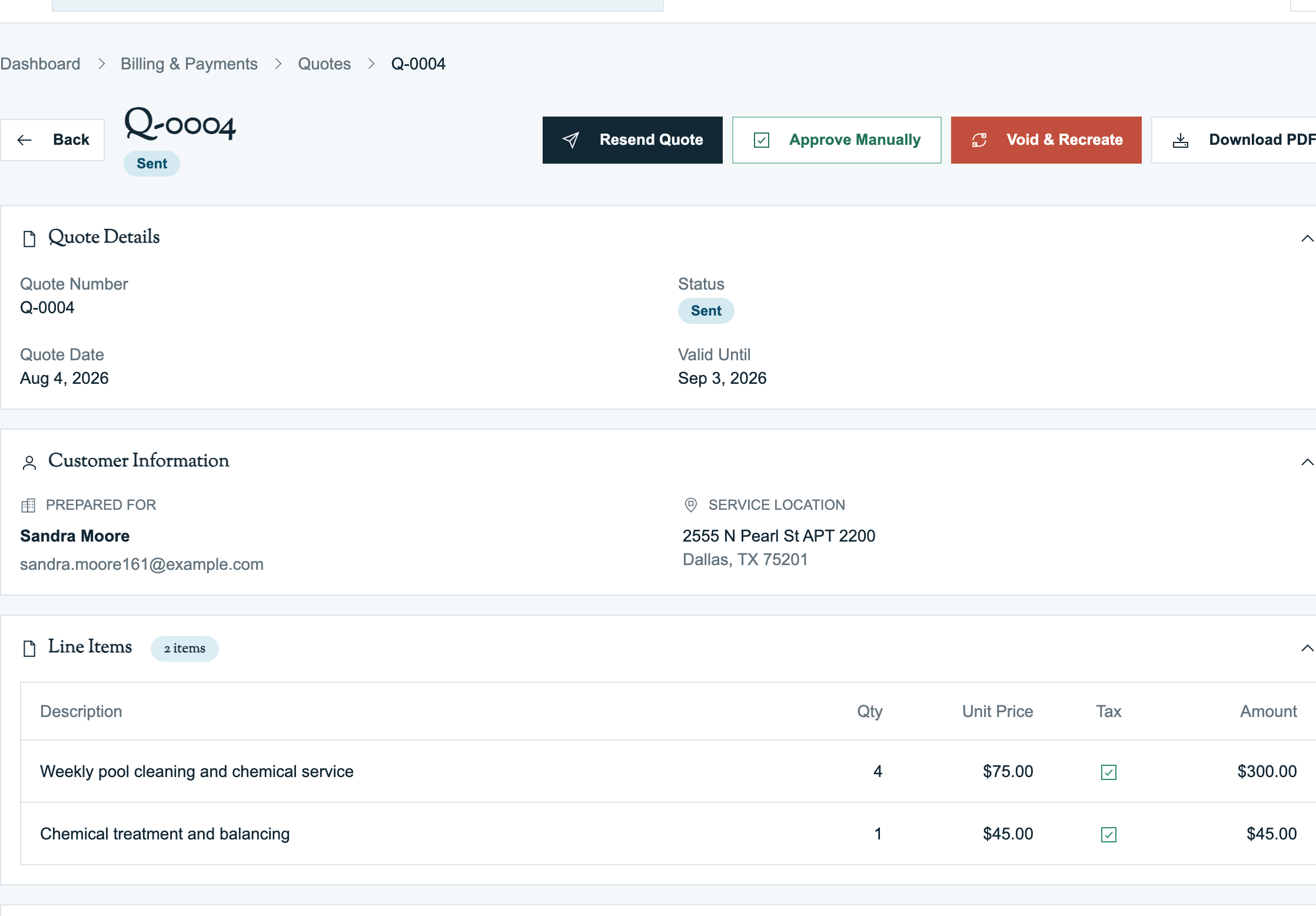
| Sent | Emailed. The customer has a public approval link. | Resend, void, void & recreate, manually approve, manually reject |
| Approved | Customer signed (or staff approved on the customer's behalf). | Generate deposit invoice, generate final invoice, create work order, void & recreate |
| Rejected | Customer declined, or you marked it rejected with a reason. | Read-only. Use Void & Recreate to make a revised version. |
| Expired | Passed the expiration date with no action. | Read-only. Send a new quote with a fresh expiration. |
| Void | Cancelled by staff with a reason. The customer's approval link no longer works. | Read-only. Original quote stays in the audit trail. |
The Activity Log on the quote detail page records important events such as creating, sending, viewing, approving, rejecting, voiding, and converting a quote.
Tip: A quote in Sent status that the customer never opens does not automatically change to Expired on its expiration date. If a customer tries to approve it after that date, they will see an expired message. Filter your dashboard by Sent weekly to catch stragglers.
Anatomy of a Quote
Every Pool Runs quote has the same building blocks:
| Block | What goes there |
|---|---|
| Quote number | Auto-generated, configurable format (default: QUO-2026-04-00001). See Quote Settings. |
| Customer + Property | Who the work is for and where. Property is optional but required to convert to a work order. |
| Quote date / Valid until | The quote date is when it was prepared. Valid until defaults to 30 days from quote date. |
| Line items | One row per part, chemical, service, or fee. Each has description, quantity, unit price, and a taxable flag. Items can be linked to your products catalog for consistency. |
| Discounts | Flat-dollar or percent-off discounts that apply to subtotal. |
| Tax | Calculated at your org's default tax rate. Only taxable line items are taxed; discounts are applied proportionally. |
| Down payment | Optional. Flat amount or percentage of the total. Drives the deposit invoice. |
| Customer message | Free-text shown on the quote PDF and approval page. Pre-fills from your default. |
| Terms & Conditions | Free-text shown on the quote PDF and approval page. Pre-fills from your default. |
| Internal notes | Private — never shown to the customer. |
Pool Runs totals the line items, subtracts discounts, calculates tax on taxable items, and then applies the deposit. The remaining amount becomes the balance due.
Quote Numbering and Defaults
Org admins control numbering and prefilled text under Settings → Quote Settings.
You can set:
- Prefix / Suffix (e.g.,
QUO, optional region tag like-TX) - Number format: pick a preset (
{PREFIX}-{YYYY}-{MM}-{NNNNN}, compact{PREFIX}{YYYY}{NNNNN}, simple{PREFIX}-{NNNNN}, etc.) or write a custom one with{PREFIX} {SUFFIX} {YYYY} {YY} {MM} {M} {DD} {NNNNN} {NNN}placeholders. - Starting number: locked once your first quote is created. Useful only if you are migrating from another system mid-year.
- Default customer message and default terms & conditions that pre-fill every new draft. You can override per quote.
Tip: Use the default terms field to bake in your standard warranty language and payment terms ("50% deposit due before work begins; balance due within 7 days of completion"). This saves typing and keeps your business legally consistent.
Access by Role
Admins can decide which roles may view, create, edit, send, approve, reject, or void quotes. Configure this under Members in the sidebar. Restricted users can still see the Quotes menu, but actions they are not allowed to use are hidden.
FAQ
Q: Do my customers need a Pool Runs login to view a quote? A: No. The approval email contains a unique secure link that works for 90 days. Voiding the quote or using Void & Recreate closes the old link.
Q: Can I quote without a property? A: Yes — a customer alone is enough to draft and send a quote. But to convert the approved quote to a work order, the system will prompt you to assign a property at conversion time (existing or new).
Q: What happens to the quote PDF if I change the line items later? A: You can't change line items after sending. Pool Runs saves the exact PDF the customer received, so you can always see what was sent. To change pricing or scope, use Void & Recreate, which preserves the history.
Q: Are quotes synced to QuickBooks? A: No. Quotes are a Pool Runs-only document. Only the invoices that come out of approved quotes sync to QBO. This is intentional — quotes are sales/proposal artifacts, not GL transactions.
Q: How do I know if a customer opened the quote email? A: The Activity Log on the quote detail page shows when the email was sent and when the customer opened the link. Open-rate and follow-up reports are on the roadmap.
Related Articles
- Creating a Quote — Full builder walkthrough; also covers editing & Void & Recreate
- Sending a Quote — Email delivery, the public link, and the customer approval / e-signature flow
- Converting a Quote — Quote → invoice / work order