Work Order Types
Reusable job templates that pre-fill pricing, checklists, and parts, provide subscription defaults, and decide how the job bills.
Work Order Types
A work order type is a template for a job you do over and over: filter clean, salt cell cleaning, pump repair, green pool recovery. Set it up once and every work order of that type inherits the price, the checklist, the parts list, the customer email, and the billing behavior. Types are the difference between re-entering the same job from scratch and picking it from a dropdown.
Types live in Settings → Work Order Types. The list shows each type's color, default price, attached checklist, and feature badges like Email and Recurring.
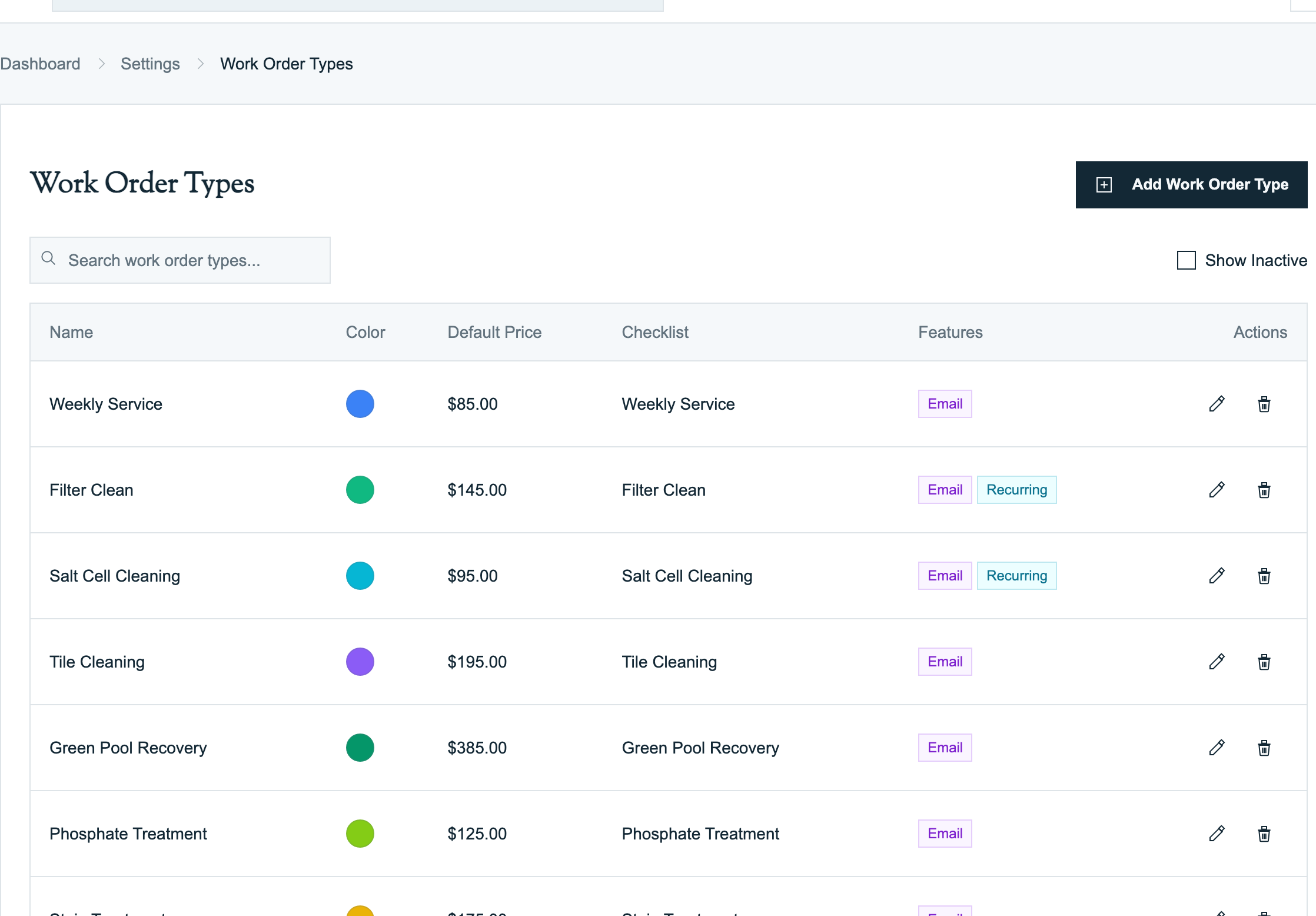
Use Search work order types to find a type by name. Turn on Show Inactive when a retired type seems to be missing. Inactive types stay available for history but do not appear when someone creates a new job.
How inheritance works
The type is the master recipe. Work orders and subscriptions use that recipe, but they are separate records:
| Record | What it controls | What happens when the type changes later |
|---|---|---|
| Work order type | Starting price, time, work needed, checklist, items, field requirements, communication, and invoice rules | New work orders and subscriptions can inherit the new defaults. |
| Work order | One actual customer visit | It keeps the snapshot it received at creation. Per-job overrides do not change the type. |
| Service Subscription | A recurring service for one customer and property | It can inherit the type's price and cadence or override either one for that customer. |
Anatomy of a type
Open a type (or click Add Work Order Type) and you get one page with everything the template controls:
Basic Information
Name, a Color Code (this is the chip color you see on work order cards and the schedule), Default Work Needed (pre-fills the work order description), and an Active Status toggle.
Pricing & Labor
- Default Price: what the job bills unless someone overrides it. Filter Clean here defaults to $145.
- Labor Cost: the internal payout to the tech. Never shown to the customer.
- Est. Minutes: how long the job takes, pre-filled on every work order.
Checklist & Requirements
- Default Checklist: the task list techs work through on their phone. Built in Checklists, attached here.
- Photo on Completion: when on, techs cannot finish the job without at least one photo.
- Technician Can Create: whether this type appears in the mobile app's New Work Order wizard. Leave it off for jobs you want the office to open.
Recurrence (Optional)
Set Recurrence and Interval to define the default cadence for customer Service Subscriptions that use this type. Filter Clean above is Monthly with an interval of 3, meaning every 3 months.
Saving this setting does not enroll every customer or create work orders by itself. Create a subscription for the specific customer and property. The subscription can keep the type default or override it. When a work order tied to an active subscription is completed, Pool Runs advances that subscription's next due date.
Customer communication
Each type controls what the customer hears when the job wraps up:
- Send completion email: techs are prompted to send a service email when they complete this job type.
- Alert office on completion: fires the Work Order Alert (Office) email when a job of this type is added or finished.
- Subject Line Override / Email Header / Email Message: per-type email templates. Use the smart-field menu to insert the customer name, work-order type, or technician name. The technician can still edit the message before sending.
- Always include swim wait safety notice: forces the chemical safety notice into the email regardless of what was logged. Meant for types like green pool recovery where the customer should stay out of the water either way.
Associated Items
The parts the job normally consumes, with quantity and price. Filter Clean ships with a cartridge element, a tank o-ring, and a filter gauge. These load onto every new work order of this type as Items Needed, so the tech knows what to put on the truck, and on itemized jobs they become the invoice lines when marked as used.
Line Item Defaults: how the job bills
The bottom of the form decides what the customer's invoice looks like:
| Setting | What it does |
|---|---|
| Line Item Description | The line's wording on the invoice. Blank = the work order name. |
| Use "Work Needed" / "Work Performed" | Put the job's description or the tech's write-up on the line instead. |
| Use WO Price on Invoice | The flat-rate switch. On: a priced work order becomes one service line and used parts stay operational detail. Off: used items become invoice lines; the work-order price is only a fallback when there are no billable items. |
| Taxable | Whether the line picks up tax. |
| Requires invoicing | Sets the suggested action when the completed job lands in Ready to review: on suggests "Generate invoice," off suggests "Close · no invoice." Good for types that never bill, like a diagnostic visit that leads to a separately billed repair. |
Worked example: semi-annual filter clean
- Settings → Work Order Types → Add Work Order Type.
- Name it
Filter Clean, pick a color, set Default Price145, Est. Minutes75. - Attach the Filter Clean checklist, and turn on Photo on Completion so there is proof for the customer.
- Set the default Recurrence to Monthly, interval 6 for a twice-a-year cadence (or 3 for quarterly).
- Add the parts under Associated Items: cartridge element, o-ring, gauge.
- Turn on Send completion email and Use WO Price on Invoice.
- Save. The job is now a quick pick on any work order, and every completed filter clean suggests a $145 invoice.
- For customers who receive the service repeatedly, create a Service Subscription and select this type. Keep the defaults or override the cadence and price for that account.
FAQ
Q: If I change a type's price or checklist, do existing work orders update? A: No. Template changes apply to work orders created after the change. Existing jobs keep the snapshot they were created with, including any per-job overrides.
Q: Does turning on recurrence create work orders automatically? A: No. Recurrence on the type is a default for Service Subscriptions. Create a subscription for each customer and property that should receive the recurring service. The subscription appears in Subscriptions, where the office schedules the due work.
Q: Can one customer have a different price or cadence from the type? A: Yes. Keep the subscription values on default to inherit the type, or set a customer-specific override. Changing the subscription does not change the master type.
Q: What is the difference between Default Price and Labor Cost? A: Default Price is customer-facing, it is what the job bills. Labor Cost is the internal payout to your tech and never appears on an invoice.
Q: Flat rate or itemized, which should I pick? A: Flat rate (Use WO Price on Invoice on) when you quote the job as one number, which is most maintenance and standard repairs. Itemized when the bill should reflect actual parts used, like larger repairs with variable materials. See Work Order to Invoice.
Q: Why can't my techs see a type in the mobile wizard? A: That type's Technician Can Create toggle is off. It is per type, so you can let techs open a "Filter Clean" but reserve "Drain and Refill" for the office.
Q: What happens when I delete a type? A: It deactivates: it disappears from new work order creation, but existing work orders and history keep it. Flip Active Status back on to restore it.
Q: Do I have to attach a checklist? A: No. A type can be as thin as a name and a price. Add the checklist when you want required steps and photo proof in the field.
Related
- Creating Work Orders (Web): what the template pre-fills at creation time
- Checklists: building the task lists types attach
- Work Order to Invoice: flat rate vs itemized on the final bill
- Creating Work Orders (Mobile): where Technician Can Create matters