Manual Payment Recording
How to log payments received outside Stripe — cash, mailed checks, Zelle, Venmo, CashApp, wire transfers, and applied credit. The full Record Payment workflow with field-by-field guidance.
Manual Payment Recording
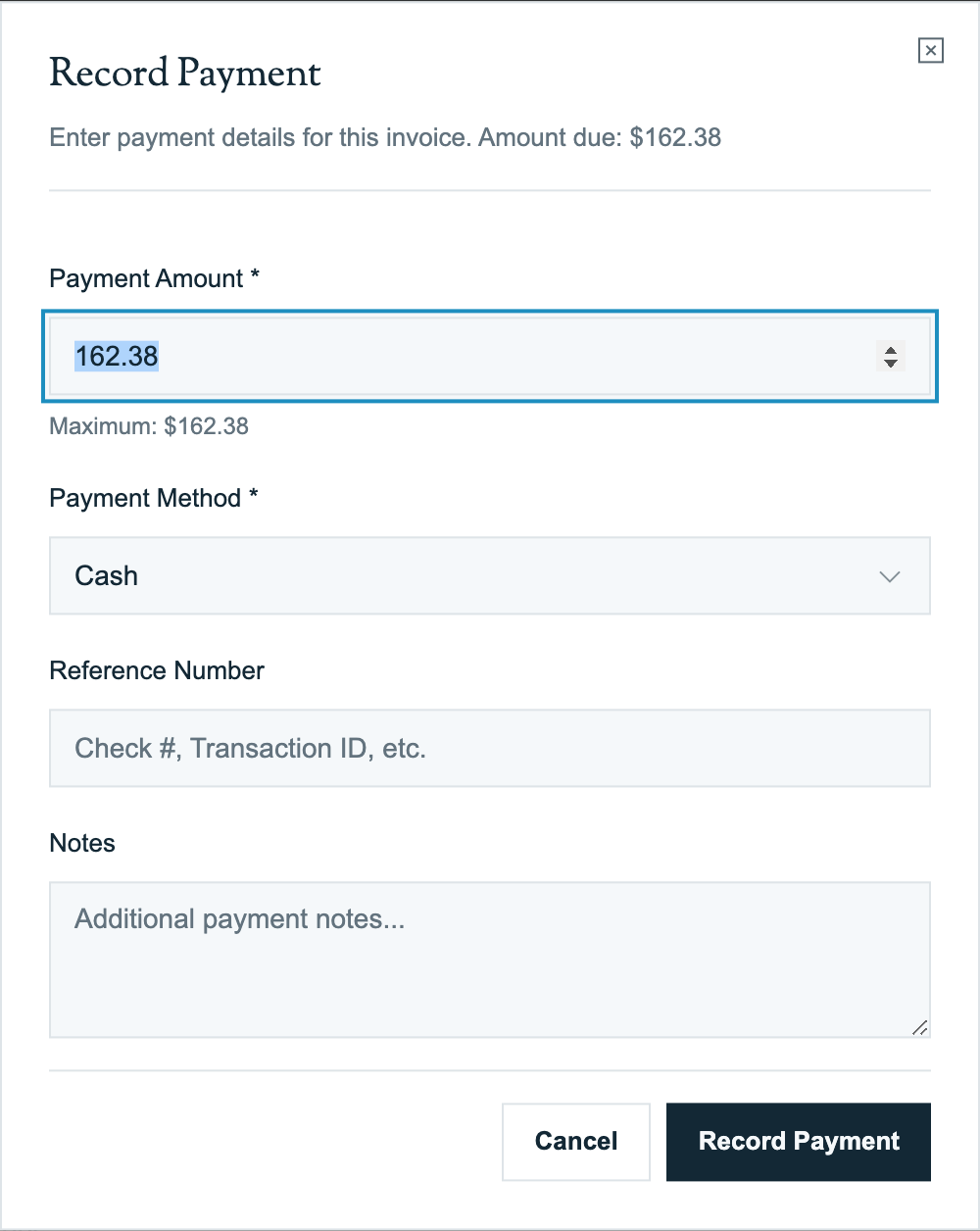
When a customer pays you outside Stripe — a mailed check, cash on-site, a Zelle transfer, a wire — the system has no way to know about it until you tell it. Record Payment is the form for that. This page is the operational manual: every supported method, what to put in the reference field, when to use "Other," and the workflow for batch-entering a stack of mail-day checks.
Before You Start
- The invoice exists in Pool Runs and is in a payable state (
sent,viewed,partial, oroverdue— notvoid,cancelled, orrefunded) - Your role has invoice create permission (typically office manager or owner)
- The actual payment has been received (cash in the safe, check in hand, Zelle confirmed in your business account)
Quick Steps
- Open the invoice from Invoices list (or from the customer profile)
- Click Record Payment (top right of invoice detail)
- Select Payment Method (see method guide below)
- Enter Amount (defaults to remaining balance)
- Set Payment Date (defaults to today — but use the actual receipt date)
- Enter Reference Number (check #, transaction ID, or "(none)")
- Add Notes if useful for memory (where, who, why)
- Click Save
- Invoice status flips to
paid(full payment) orpartial(partial)
Supported Payment Methods
The supported methods:
| Method | Use case | Reference field |
|---|---|---|
| Cash | Customer hands you cash on-site | Optional ("Receipt #" or recipient name) |
| Check | Mailed check or in-person check | Check number (required for bank deposit reconciliation) |
| Credit Card | Card swiped via a different terminal (Square, Clover, etc.) | Last 4 digits or auth code |
| Debit Card | Same as credit card, offline | Last 4 digits |
| ACH | Bank-to-bank transfer arranged manually (not Stripe) | Trace ID or bank reference |
| Wire Transfer | Wire received from customer's bank | Wire confirmation number |
| Stripe | Online payment via Stripe (auto-recorded — should NOT be manually entered) | Auto-populated |
| Applied Credit | Customer has an existing credit balance, applied to this invoice | Source credit ID or invoice # |
| Other | Zelle, Venmo, CashApp, money order, anything else | Free text describing what it was |
Cash
Most common for in-person cash payments at the customer's home or business:
- Reference: optional. If you give the customer a printed receipt with a receipt number, put it here.
- Notes: typically the technician's name (so you remember who took the cash), e.g., "Tech: Mike, paid in person Tuesday"
Check
The most common manual payment method for commercial pool service:
- Reference: Check number is required for clean bank reconciliation
- Notes: optional ("Received by mail 4/18", "Endorsed and ready for deposit")
- Tip: enter the payment date as the date you received the check (the postmark or the day it landed in your hands), not today
Credit Card / Debit Card (Offline)
If you take a card via a different processor (Square, Clover, your old terminal):
- Reference: last 4 digits or the auth code from the offline receipt
- Notes: which processor (e.g., "Square reader") — useful for fee reconciliation later
- Important: the actual card processing fee on the other processor's books is separate. Pool Runs only knows what you tell it.
If the card was processed via Stripe (online via the customer payment portal), you do NOT need to manually record it — Stripe automatically notifies Pool Runs and the payment record is created for you. Don't double-record Stripe payments.
ACH (Manual)
For bank-to-bank transfers that didn't go through Stripe:
- Use case: customer's bookkeeper initiates an ACH directly from their bank to yours
- Reference: the trace ID from your bank statement (typically a long alphanumeric)
- Notes: "ACH from [customer bank name], received [date]"
Wire Transfer
For larger commercial payments, especially construction-phase invoices:
- Reference: wire confirmation number
- Notes: optional ("Wire from [customer's company name]")
- Tip: wires usually have a fee on the customer's side; they may complain about a $25 wire fee deducted
Applied Credit
Used when a customer has a stored credit balance you owe them, and you're applying it to this invoice:
- Reference: the source credit ID or original invoice number
- Notes: "Credit from voided invoice INV-2026-0123"
- Tip: this is a paper-trail entry only — no actual money moved. The credit comes from somewhere else (a refund you owed but didn't issue, an overpayment that was credited, etc.).
For more on tracking credits, see Invoice Adjustments.
Other
The catch-all for everything that doesn't fit the named methods. Most commonly used for:
- Zelle: "Zelle" + reference (transaction ID or sender name)
- Venmo: "Venmo" + reference
- CashApp: "CashApp" + reference
- PayPal: "PayPal" + transaction ID
- Money order: "MoneyGram" or "USPS Money Order" + serial number
- Bartered service: "Trade — [what was traded]"
- Vendor credit applied: "Vendor credit applied"
Be descriptive in the Notes field for "Other" payments — six months from now you (or your accountant) need to figure out what this was.
The Record Payment Form Fields
| Field | Required | Notes |
|---|---|---|
| Amount | Yes | Defaults to remaining balance. Cannot exceed remaining (unless overpayment is intentional — then it caps at total). |
| Payment Date | Yes | Defaults to today. Use actual receipt date for accurate aging. |
| Payment Method | Yes | Pick from the enum |
| Reference Number | No | Strongly recommended for check, ACH, wire |
| Notes | No | Free text, max 500 chars. Useful for context. |
The form prevents a few error cases:
- Amount > remaining balance → error message
- Amount ≤ 0 → error
- Voided / cancelled / refunded invoices → can't record payment
- If down-payment is required and not yet met, first payment must meet the minimum
What Happens After You Save
- The payment is recorded as succeeded.
- The invoice's net paid is recalculated (sum of succeeded payments minus refunds).
- Invoice status updates:
- Net paid = total →
paidand paid date stamped - Net paid > 0 but < total →
partial - Net paid = 0 → unchanged
- Net paid = total →
- Invoice history entry logged: who recorded the payment, the method, the amount.
For where the record ends up next — Pool Runs only, or also QuickBooks — see the setup-specific guide:
If you make a mistake, see "Editing or Deleting a Payment" below.
Batch Entry: Mail-Day Workflow
When you have a stack of 20 checks from the day's mail:
- Sort the checks by customer name (or invoice number if the customer wrote it on the check)
- Open Pool Runs → Invoices, sort by status (
overdue,sent,viewed) - For each check:
- Find the customer's open invoice (use the search bar)
- Click Record Payment
- Method: Check, Reference: check number
- Save
- Stack the entered checks for your bank deposit (handled outside Pool Runs)
A typical batch of 20 checks takes 15–20 minutes for an experienced operator.
Search Tip
If the customer wrote the invoice number on the check (you should encourage this on your invoice template), you can:
- Type the invoice number in the global search → straight to invoice → Record Payment
- Saves 30 seconds per check vs searching by customer name
Editing or Deleting a Payment
If you record a payment incorrectly:
- Open the invoice
- In the Payments section, click the edit icon (pencil) next to the payment row
- Update the fields → Save
- (Or click delete to remove the payment entirely)
This re-runs the invoice status calculation.
Be careful: deleting a payment is rare and should only be done if the payment was truly never received (e.g., recorded against the wrong invoice). For "wrong invoice" cases, the cleaner approach is:
- Record the payment correctly on the right invoice
- Then delete the wrong one
Industry Context
A few realities about manual payment entry in pool service:
- Mail day is often the same time of day for most businesses — Tuesday/Thursday afternoons after the morning route, when the mail has been picked up. Block 30 minutes for batch entry.
- Customer-written check numbers sometimes don't match the actual check serial — they wrote the wrong number. Don't sweat it; reference field is for reconciliation, not legal record.
- Zelle adoption is growing in pool service — by 2026, ~10–15% of residential customers prefer Zelle for predictable monthly payments. Zero fees.
- The "Tuesday-Wednesday" payment pattern: most businesses see check payments arriving Tuesday-Thursday for invoices sent the prior Monday-Friday. Plan your dunning timing around it.
- Cash payments are declining but still present in cash-economy areas (rural, working-class neighborhoods). Don't deprecate the cash method.
FAQ
Q: Can I record a payment in advance (before the invoice is even sent)? No — the invoice must exist and be in a payable state. If you have a deposit/down-payment that came in before the invoice, create the invoice first, then record the payment. Use the actual receipt date for the payment date.
Q: Can a customer's payment cover multiple invoices? The form is per-invoice, so technically you'd record the payment against one invoice. If a single check covers multiple invoices, split it: record $X against invoice 1, $Y against invoice 2. Use the same check number in both reference fields and a note like "Check #1234 split across INV-A and INV-B."
Q: I recorded a payment, but the invoice still shows unpaid. What's wrong?
Most common cause: the payment status was set to something other than succeeded. The Record Payment form always saves as succeeded, but if you're using a different mechanism (or the data was migrated), check the status field. Other causes: payment date is in the future, or refunded payments are confusing the math.
Q: What if the customer paid with a credit card the technician swiped on a Square reader? Record it as Credit Card (not Stripe — Stripe is reserved for online payments through Pool Runs). Reference field: last 4 of card or Square auth code. The fee on the Square side is separate from your Pool Runs accounting.
Q: Can I record a payment for someone other than the invoice's customer? The payment record is tied to the invoice, which is tied to a customer. If a different customer paid (e.g., a related family member's account paid for this invoice), record it on this invoice with a note about who actually paid. Don't try to track inter-customer transfers in Pool Runs — handle that in your accounting system.
Q: What's the difference between recording a payment and creating an Applied Credit? A payment represents money actually received from outside (cash, check, etc.). Applied Credit is using a previously-stored credit (from an overpayment, refund-as-credit, etc.) on this invoice. Use Applied Credit only when there's a real credit balance you're drawing from.
Troubleshooting
| Symptom | Likely cause | Fix |
|---|---|---|
| "Cannot add payment to voided invoice" | Invoice is void, cancelled, or refunded | Recreate as a new invoice if needed |
| "Payment amount exceeds amount due" | Check is for more than the invoice balance | Reduce the amount, OR flag for overpayment handling (apply remainder as credit) |
| "First payment must be at least $X" | Down-payment requirement isn't met | Bring the payment up to the required minimum |
| Saved but invoice status didn't change | Payment status accidentally set to pending or failed | Edit the payment, change status to succeeded |
Related Documentation
- Recording Payments — Foundational coverage of payment basics.
- Customer Profiles — Per-customer billing & activity view.
- Invoice Adjustments — Voids, credits, write-offs.
- Pool Runs + QuickBooks — How manual payments fit when QBO is your accounting system.
- Pool Runs + Stripe — How manual payments fit when Pool Runs is your only record.
Collections
How to log payments received outside Stripe (cash, check, Zelle, Venmo) in Pool Runs, and how to handle past-due accounts using the tools that exist today.
QuickBooks Online Integration
Connect Pool Runs to QuickBooks Online so customers, invoices, payments, products, and refunds stay in sync without double-entry.