Choose Your Billing Setup
Pool Runs supports two billing setups — with QuickBooks Online for full accounting sync, or Stripe-only with Pool Runs as the system of record. Pick the one that matches how you keep books.
Choose Your Billing Setup
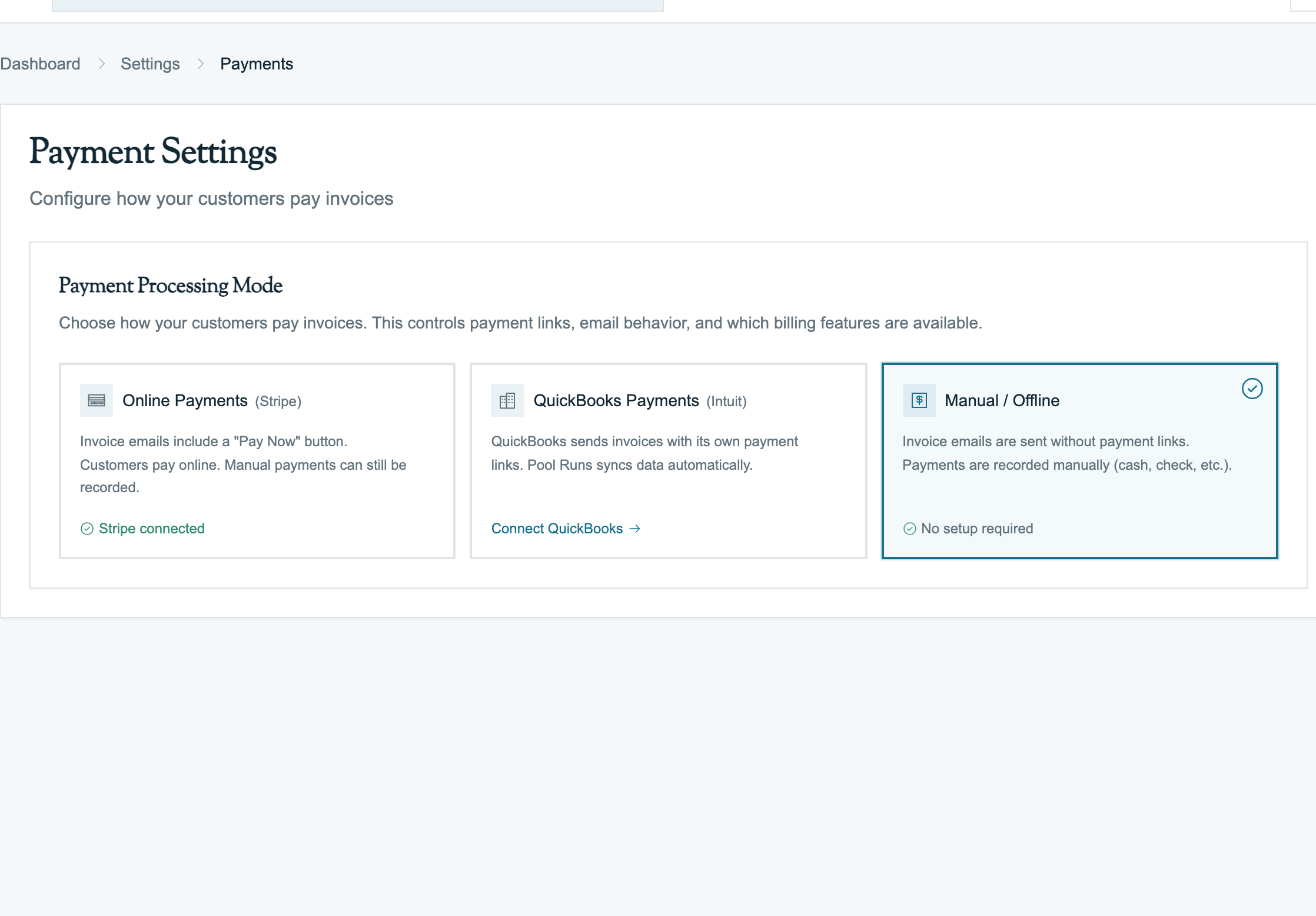
Billing in Pool Runs works differently depending on whether you keep your books in QuickBooks Online or whether Pool Runs itself is the financial system of record. Most of the day-to-day flow — drafting an invoice, sending it, taking a check — looks the same either way. But where the data ends up, who owns the chart of accounts, and how reconciliation works diverges sharply.
Pick your setup and follow the matching guide:
| If you… | Use this guide |
|---|---|
| Already keep your books in QuickBooks Online (or plan to) | Pool Runs + QuickBooks |
| Don't use QuickBooks — Pool Runs is your billing source of truth, customers pay online via Stripe (and you record manual payments by hand) | Pool Runs + Stripe |
Not sure? See Which setup is right for you below.
What Stays the Same
Regardless of setup, these all work identically:
- Drafting invoices — manual, from a quote, from a work order, or in bulk via the Invoice Generator.
- Sending invoices — emailed to the customer with a public payment link (when Stripe is connected).
- Recording manual payments — cash, check, Zelle, Venmo, ACH, wire, applied credit. The Record Payment form is identical.
- Voiding, refunding, and adjusting invoices — the operations work the same way.
- Customer profiles, properties, work orders, routes, quotes — these are operational records that don't depend on your accounting setup.
- Tax zones — Pool Runs computes tax on its side using its own zones (regardless of QBO).
What Changes Between Setups
| Concern | With QuickBooks | Without QuickBooks |
|---|---|---|
| Where your chart of accounts lives | QBO | n/a — Pool Runs has no chart of accounts |
| Where your P&L and balance sheet are produced | QBO | An external tool (spreadsheet, Wave, Xero, your accountant) using exports from Pool Runs |
| What happens after you finalize an invoice | Pool Runs syncs it to QBO; QBO is now the second copy | Stays only in Pool Runs |
| When a Stripe payment comes in | Pool Runs records it, then syncs to QBO as a Payment | Pool Runs records it; that's the only record |
| Stripe payouts to your bank | Optionally sync to QBO as Bank Deposits with fees broken out | Visible in Stripe Dashboard; you reconcile against your bank statement manually |
| Refunds | Sync to QBO as Refund Receipts | Recorded in Pool Runs only |
| Income categorization (Filter Clean vs Acid Wash vs Maintenance) | QBO Items with income accounts attached drive the P&L breakdown | Pool Runs line-item descriptions; categorize externally |
| Tax filing prep | QBO reports + your QBO sales tax setup | Pool Runs invoice export + your accountant |
| Sales tax remittance | QBO sales tax module | Manual using Pool Runs reports |
Which Setup Is Right for You
Use Pool Runs + QuickBooks if…
- You already have a QBO subscription (Simple Start, Essentials, Plus, or Advanced).
- A bookkeeper or accountant prepares your taxes from QBO data.
- You want one click reconciliation between Stripe payouts and your bank deposits in QBO.
- You categorize revenue by service type (Filter Clean, Acid Wash, Equipment Install) and need that breakdown on a P&L.
- You file sales tax in multiple jurisdictions and want QBO to track it.
This is the most common setup for established pool service businesses.
Use Pool Runs + Stripe if…
- You're a newer or smaller operator and Pool Runs is the only place invoices and payments live.
- Your accountant is fine working from CSV exports at month-end or year-end.
- You don't need automatic income-account categorization on a per-line basis.
- You want to defer the QBO subscription cost until the business is bigger.
- You use a different accounting tool (Wave, Xero, FreshBooks) and bring data in manually.
You can always add QuickBooks later — the integration runs forward from connect-day, so no historical re-sync is required. See QuickBooks Overview.
What About Pool Runs without Stripe?
You can technically run Pool Runs without Stripe at all — drafting invoices, emailing them, and recording every payment manually. This works for small operators where every customer pays by check or cash.
The trade-offs are real:
- No public payment link — customers can't pay online; every payment is logged manually.
- No autopay — recurring monthly billing can't auto-charge a saved card.
- More collections work — without "Pay Now" friction, more invoices age past due.
If this matches your business, the Pool Runs + Stripe guide still applies — just skip the Stripe sections. Most operators connect Stripe within their first week once they see the collections difference.
Adding QuickBooks Later
If you start without QBO and decide to connect later, this is what happens:
- All future invoices and payments sync to QBO from connect-day forward.
- Historical invoices stay in Pool Runs only — they don't backfill automatically. (Support can do a manual backfill if you need it.)
- Your customer list pushes to QBO during the setup wizard.
- Your existing QBO Items (services, parts) can be imported and matched to Pool Runs records.
See Setting Up QuickBooks for the connection walkthrough.
Related Sections
- Pool Runs + QuickBooks — Full lifecycle when QBO is your accounting system.
- Pool Runs + Stripe — Full lifecycle when Pool Runs is the books.
- QuickBooks Overview — What syncs and how.
- Stripe Overview — How online payments work in either setup.
What Syncs to QuickBooks
How Pool Runs customers, items, invoices, payments, and refunds map to QuickBooks Online — what fields move, what triggers a sync, and how conflicts resolve.
Pool Runs + Stripe
How billing works end-to-end when Pool Runs is your accounting system of record. Stripe collects online payments, you record manual payments, and you export to your accountant at month-end or year-end.